

Pros
- Flexible boards and columns for many workflows
- Kanban stayed synchronized with Main Table in our test
- Status automation triggered successfully
- WorkForms created structured board items from a public-style form
- Dashboards and multiple views reuse the same underlying data
- Sidekick accurately read board context and completed a scoped field update
- Free plan available after the Pro trial
Cons
- −Interface exposes a lot of controls at once
- −Calendar needed manual date-column mapping in our setup
- −Default dashboard widgets should be checked for filter assumptions
- −Per-seat costs rise as teams grow
- −AI usage adds a separate credit variable to paid-plan budgeting
- −The Free plan is much more limited than the Pro trial we tested
Testing disclosure: monday.com did not sponsor, review, or approve this article. ProxVela created its own monday.com account and independently tested the 14-day Pro trial on September 16, 2026. We did not enter payment details, receive vendor-provided access, or have an affiliate relationship with monday.com during testing. The workspace, tasks, dates, form submissions, and AI prompts shown below were created by ProxVela for this review. See our review methodology and editorial policy.
This hands-on monday.com review tests onboarding, board setup, Kanban, automations, dashboards, Sidekick AI, WorkForms, Calendar, Gantt, search, and the current pricing structure using a real ProxVela content-production workflow.
We did not stop at the marketing pages. We built a working editorial board, changed statuses between views, created and triggered an automation, asked Sidekick to analyze live board data and then modify it, submitted a real WorkForm response, and verified that the response became a board item.
Overview: What is monday.com?
monday.com is a work-management platform built around customizable boards, columns, views, automations, dashboards, forms, integrations, and increasingly prominent AI tools. The same board can represent projects, content pipelines, requests, campaigns, operations, or other structured work.
For this monday.com review, we used the platform as an actual ProxVela editorial system. Our board tracked a monday.com review, an existing Hostinger review, a future monday.com affiliate application, and a form-submitted ClickUp suggestion. That gave us a realistic way to test whether the product could move from simple task tracking into automation, reporting, intake forms, and AI-assisted work.
monday.com review methodology: How we tested it
- Kanban drag-and-drop updated the underlying Status field immediately.
- Our status-triggered automation produced a real notification after a test task was moved to Done.
- Sidekick correctly summarized the board, identified the highest-priority task, and changed a different task to Medium priority without altering its status or due date.
- A public WorkForm submission created a new ClickUp item on the board with the URL, category, and explanation preserved.
- Calendar required us to map the Due date column manually, while Gantt picked up our dated tasks once the view was added.
Onboarding and board setup
monday.com asked why we were signing up, what type of work we wanted to manage, and what we wanted to focus on first. We selected Work, Marketing, and Content calendar because those choices matched ProxVela’s use case. We skipped teammate invitations and named the first board ProxVela Content Production.
The onboarding flow let us select Owner, Status, and Due date as initial columns. After the board opened, we added a Priority column and assigned the monday.com Review item to ProxVela with a High priority and a September 17 due date.
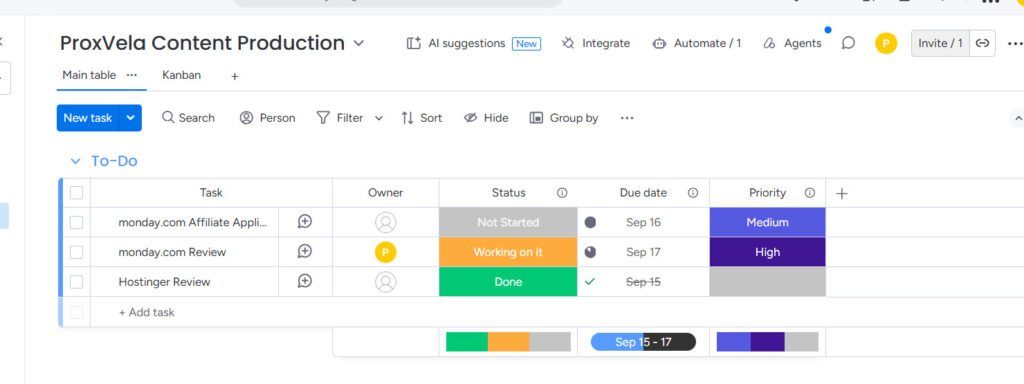
Basic board creation was straightforward. monday.com made the status and people columns understandable without a tutorial, and changing fields directly in the table was quick. The interface is dense, though; new users are exposed to views, AI suggestions, integrations, automations, agents, and other controls almost immediately.
Features: boards, Kanban, forms, automations, and views
Kanban drag-and-drop stayed synchronized with the table
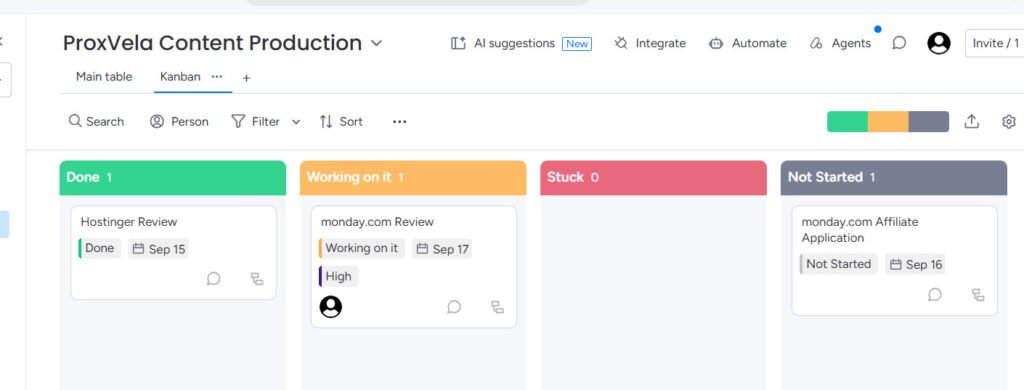
Our first meaningful workflow test was the Kanban view. monday.com automatically grouped the same board into Done, Working on it, Stuck, and Not Started columns based on Status.
We dragged the monday.com Affiliate Application card from Stuck to Not Started. The move happened immediately. When we returned to Main Table, the Status field had also changed to Not Started. We did not need to save or refresh the board manually.
Automations worked in a real trigger test
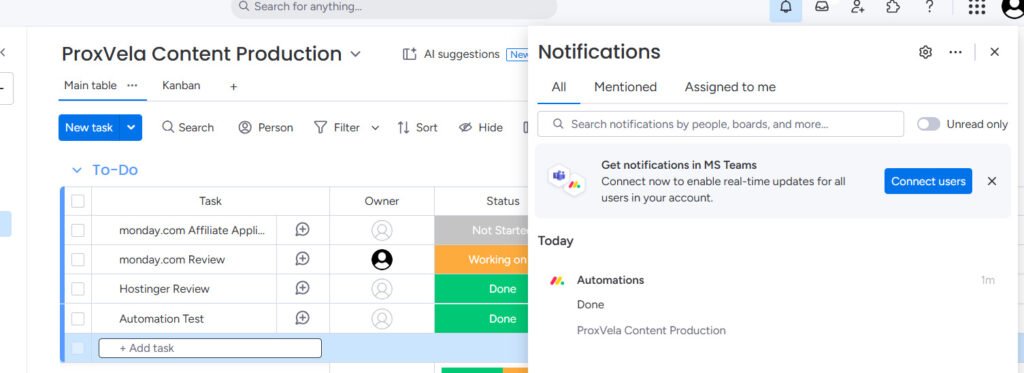
We created a simple built-in automation: When Status changes to Done → notify ProxVela. To verify it instead of merely assuming the recipe worked, we created a temporary Automation Test item and changed its status from Not Started to Done.
The notification appeared in monday.com’s notification panel within our test session. We then deleted the temporary item and kept the automation active on the board.
WorkForms can turn external submissions into board items
We added a Form view and converted it into a public-style Suggest a Product for ProxVela form. We removed internal fields such as Owner, Status, Due date, and Priority, then added Product Website URL, a category selector, and a long-text explanation field.
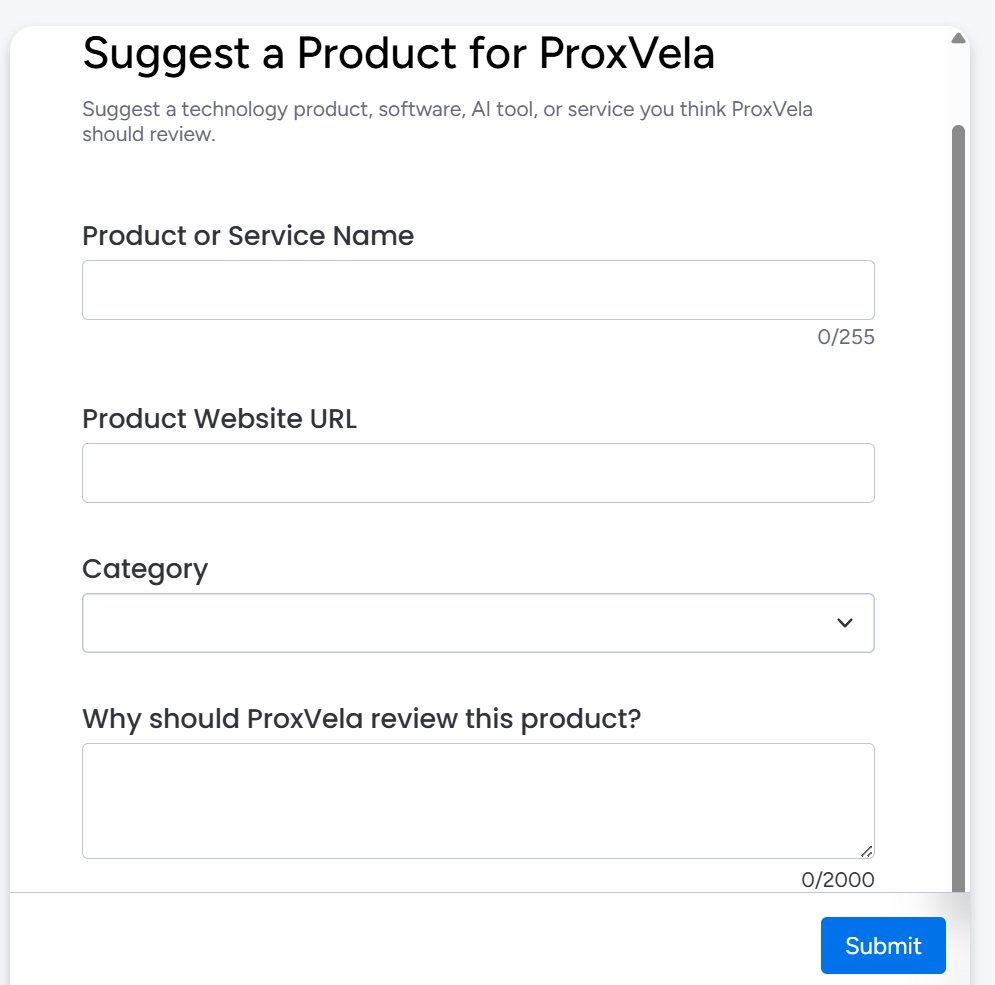
We submitted ClickUp, its website URL, the Software / SaaS category, and a reason for reviewing it. monday.com displayed the thank-you page, and the response then appeared as a new ClickUp row on the board with the submitted values preserved.
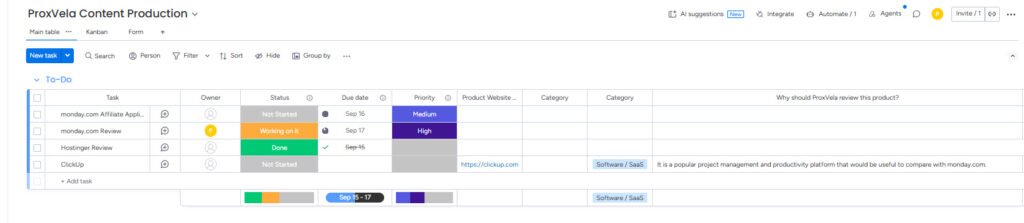
That makes WorkForms useful for content requests, project intake, approvals, service requests, or other workflows where people outside the core board need to submit structured information.
Calendar and Gantt views use the same board data
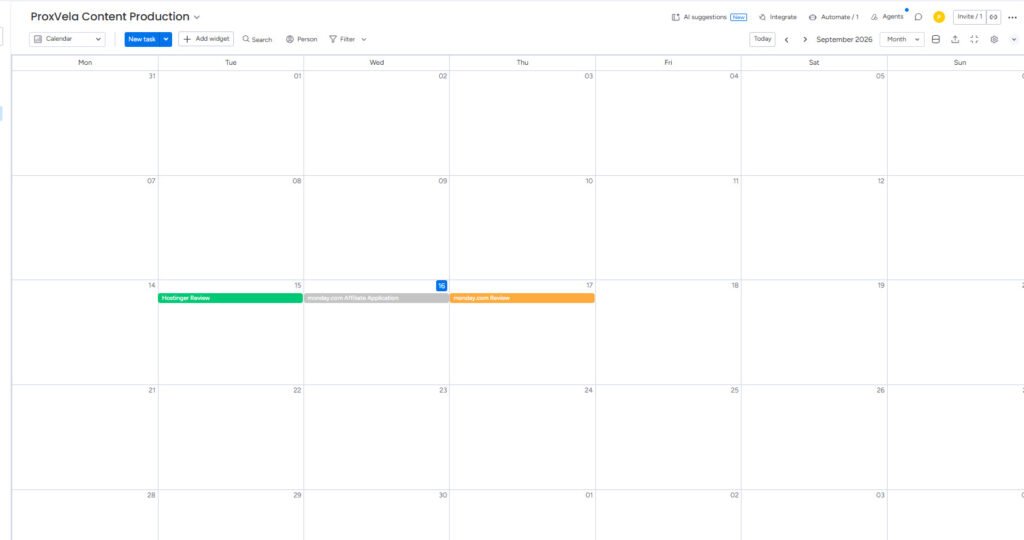
The Calendar view initially opened blank even though our board already had dated tasks. We had to open the Calendar widget settings and explicitly select the Due date column. After that mapping, Hostinger Review appeared on September 15, the affiliate application on September 16, and monday.com Review on September 17.
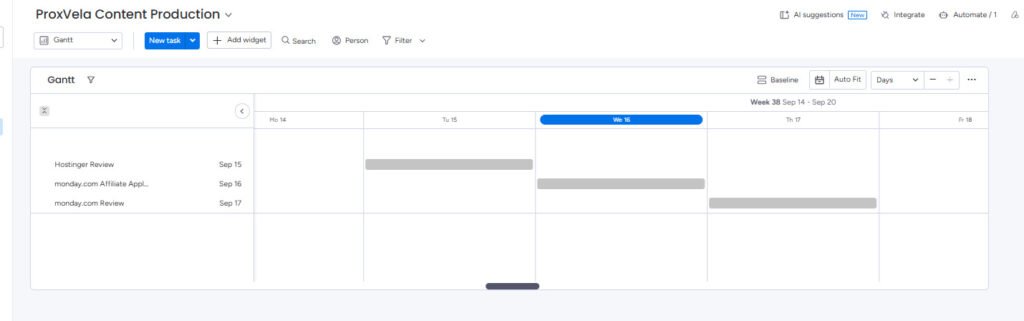
Gantt was faster to interpret once added. It displayed the same dated work along a timeline without us rebuilding the underlying tasks.
Performance and workflow behavior in our test
We did not run synthetic browser-performance benchmarks against monday.com, so this section focuses on the product’s workflow responsiveness and data consistency rather than page-load milliseconds.
During our test, table edits, Kanban moves, priority changes, and the form-created item appeared without us manually refreshing the workspace. Search also found the monday.com Review item and surfaced its current Owner, Status, Due date, and Priority in a cross-board search result.
The strongest evidence of synchronization was the Kanban test: dragging a card to a different status column changed the actual Status field in Main Table. Likewise, Sidekick’s board update was visible when we returned from AI chat to the board.
Dashboards and reporting
Our onboarding choices created a dashboard tied to the ProxVela Content Production board. It included All Tasks, In progress, Stuck, Done, Tasks by status, Tasks by owner, Overdue tasks, and Tasks by due date.
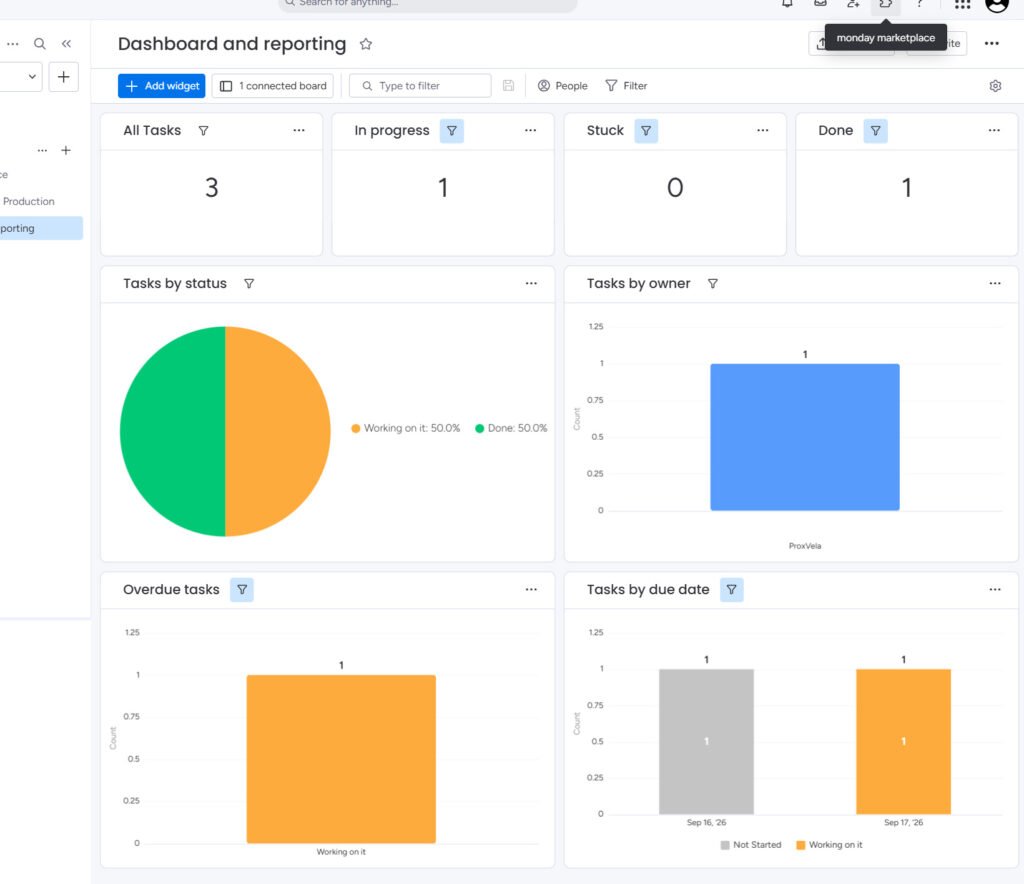
The dashboard correctly showed three tasks at that stage, one in progress, zero stuck, and one done. The owner chart correctly identified ProxVela. The default status pie chart, however, visibly represented only Working on it and Done in our setup even though the board also had a Not Started item. We would therefore review widget filters before relying on a default dashboard for management reporting.
monday Sidekick AI: useful context plus real actions
Sidekick was one of the strongest parts of our test because we could verify both understanding and execution.
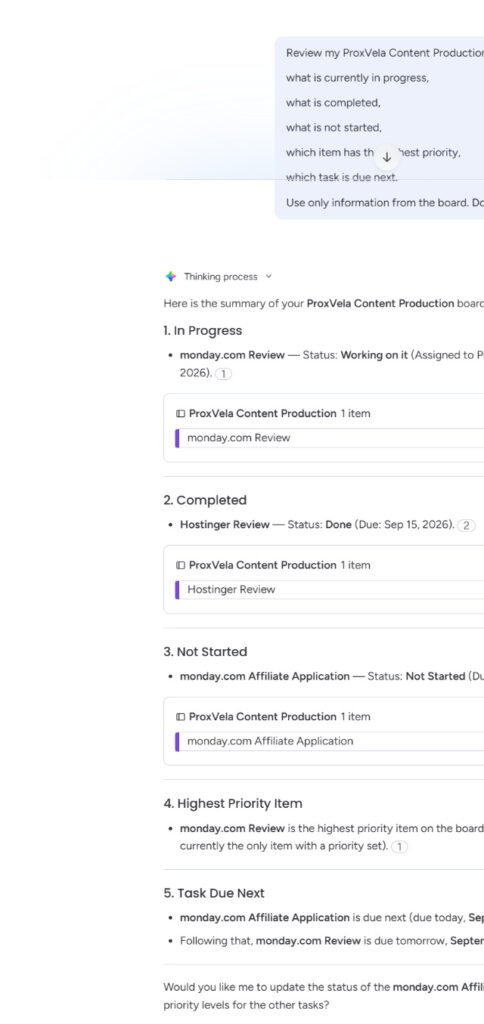
First, we asked it to review the ProxVela Content Production board and identify what was in progress, completed, and not started; the highest-priority item; and the next due task. We explicitly told it to use only board information.
Sidekick correctly identified monday.com Review as Working on it, Hostinger Review as Done, monday.com Affiliate Application as Not Started, monday.com Review as the only High-priority item, and the affiliate application as the next due task.
We then asked Sidekick to change only the affiliate application’s Priority to Medium and not modify its status, due date, owner, or any other field. Sidekick reported that the change was complete. When we returned to Main Table, Priority showed Medium while Status remained Not Started and Due date remained September 16.
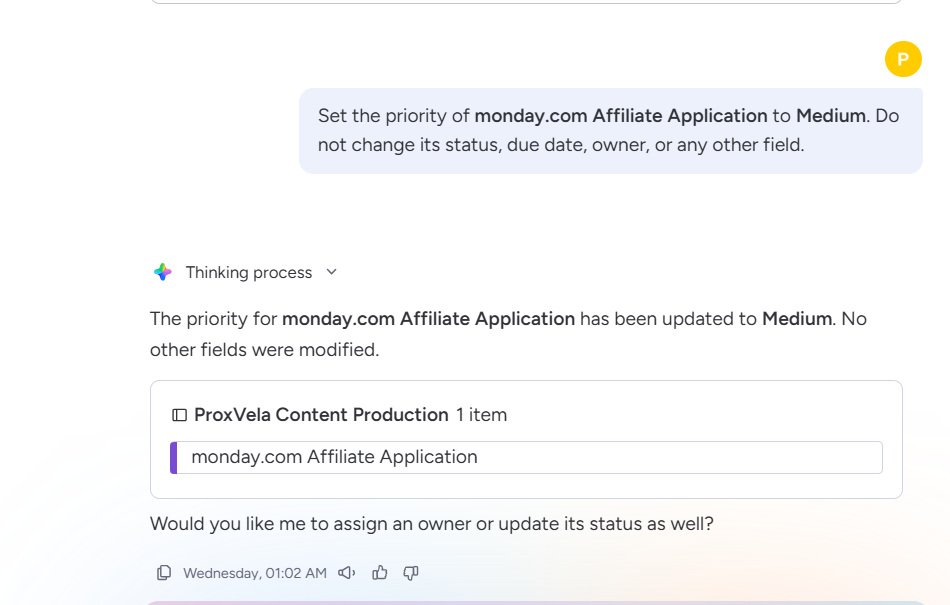
This is materially more useful than a generic chatbot embedded beside a project board. In our test, Sidekick both read the live context and performed a scoped action. monday.com also warns in its own documentation that Sidekick can sometimes produce incorrect or unexpected results, so important actions should still be reviewed.
monday.com pricing in 2026
Our new account automatically received a 14-day Pro trial. The pricing screen showed that we could continue to a paid plan or move to the Free plan; we did not purchase or upgrade anything.
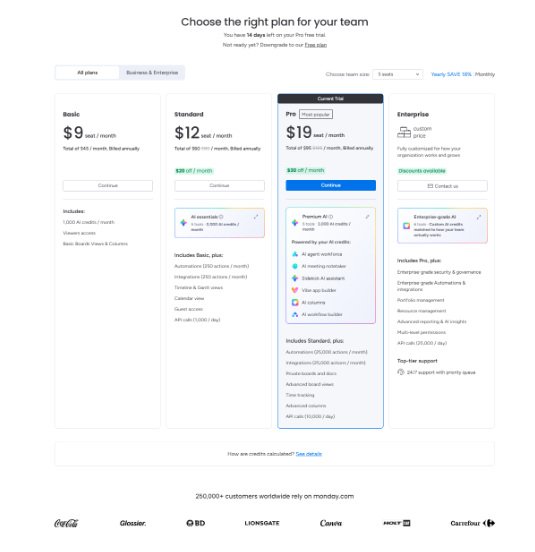
| Plan | Price | Notable current limits/features |
|---|---|---|
| Free | $0 | Up to 2 seats, up to 3 boards, mobile apps; AI available from Basic |
| Basic | $9 / seat / month | Unlimited items and viewers; 1,000 AI credits/month in the current model |
| Standard | $12 / seat / month | 250 automation actions/month, 250 integration actions/month, Timeline, Gantt, Calendar, 2,000 AI credits/month |
| Pro | $19 / seat / month | 25,000 automation and integration actions/month, advanced views, time tracking, advanced columns, 3,000 AI credits/month |
| Enterprise | Custom | Enterprise governance, resource/portfolio management, higher automation limits, custom AI credit allocation |
These are per-seat prices displayed with annual billing at the time of our September 16 fact-check. monday.com’s pricing interface can also show seat totals, AI-credit costs, discounts, or offers, so buyers should verify the checkout total for their team size.
The biggest pricing complication is that the platform now combines seat pricing with AI-credit consumption. That is more flexible than tying AI entirely to seats, but it also gives buyers another variable to estimate if Sidekick, agents, workflows, or other AI features become part of daily work.
Who should use monday.com?
Teams moving beyond spreadsheets and basic task lists
monday.com becomes more compelling when the same data needs to support table work, Kanban, forms, calendar planning, dashboards, automation, and AI assistance. Our test used one board across all of those surfaces without rebuilding the workflow.
Operations and content teams with repeatable workflows
Status-driven processes are a natural fit. Our review workflow used assignment, priority, due dates, forms, and an automation without requiring code.
Teams that want AI connected to live work context
Sidekick’s ability to inspect the board and then make a controlled field update was more useful than a disconnected text-generation tool.
Who should look elsewhere?
monday.com can be excessive for individuals who only need a lightweight to-do list. Teams that dislike configuring views, fields, and dashboards may prefer a more opinionated project-management system. Buyers with many paid users or heavy AI usage should also model the full seat-plus-credit cost instead of focusing only on the headline per-seat price.
The Free plan is useful for exploration, but it is intentionally limited compared with the Pro trial we tested. If a feature such as automation, Gantt, advanced views, or AI is central to your decision, compare the exact tier before migrating an important workflow.
monday.com alternatives worth comparing
- ClickUp: a broad productivity and project-management platform with tasks, docs, dashboards, automation, and AI.
- Asana: a more structured project-management option for teams that prefer clearer task and portfolio conventions.
- Notion: stronger when documents, wikis, databases, and knowledge management are central to the workflow.
- Trello: simpler for teams primarily interested in lightweight Kanban boards.
We did not run these alternatives through the same September 16 methodology for this article, so this list is not a direct performance ranking.
monday.com review verdict: Is it worth it?
This conclusion follows ProxVela’s published review methodology. You can also browse our technology reviews library.
monday.com is worth considering for teams that will use its workflow depth rather than treating it as an expensive task list.
Our strongest results were reliable synchronization between Table and Kanban, a status automation that triggered successfully, a flexible form-to-board workflow, useful Calendar and Gantt views, and Sidekick’s ability to both understand and modify live work context.
The trade-offs are complexity and cost. Some views require configuration, default dashboards deserve a quick filter check, and the paid model now involves both seats and AI credits. Those are manageable issues for teams that benefit from the platform’s breadth, but they matter more for very small or simple workflows.
8.8 / 10
Excellent workflow flexibility, automation, views, forms, and context-aware AI, balanced by setup complexity and a pricing model that becomes more involved as seats and AI usage grow.
Frequently asked questions
Does monday.com have a free plan?
Yes. monday.com’s current pricing page lists a Free plan for up to two seats and up to three boards. Our account was on the separate 14-day Pro trial during testing.
How long is the monday.com free trial?
Our new account received a 14-day Pro trial automatically. monday.com’s support documentation also states that new trial accounts start with 14 days of Pro access.
How much does monday.com cost?
With annual billing at our fact-check, Basic was $9 per seat/month, Standard $12, and Pro $19. Enterprise uses custom pricing. The Free plan remains $0.
Does monday.com have AI?
Yes. We tested monday Sidekick directly. It correctly summarized our live board and successfully changed one task’s Priority field after a natural-language instruction.
Did monday.com automations work in our test?
Yes. We created a rule that notified ProxVela when Status changed to Done. Changing a temporary test item to Done produced a notification in the account.
Can monday.com forms create board items?
Yes in our test. We submitted a ClickUp product suggestion through WorkForms, and monday.com created a new ClickUp board item containing the submitted URL, category, and explanation.
Does monday.com have Kanban, Calendar, and Gantt views?
Yes. We tested all three. Kanban stayed synchronized with Status, Calendar displayed our tasks after we mapped the Due date column, and Gantt plotted the dated review tasks along a timeline.
Is monday.com easy to use?
The basic board workflow was easy to understand, but monday.com’s breadth creates some setup overhead. For example, our Calendar view needed the date column selected manually before tasks appeared.
Sources and testing records
The screenshots, board data, automation run, Sidekick interactions, WorkForm submission, Calendar, Gantt, search, and trial/pricing screen described above are from ProxVela’s original September 16, 2026 testing. Current plan and AI facts were checked against monday.com’s official pages.
- monday.com official pricing
- monday.com free trial documentation
- monday.com Free plan documentation
- monday Sidekick documentation
- monday.com AI credits documentation
- monday work management getting-started guide
Tested: September 16, 2026 · Last fact-check: September 16, 2026