

Pros
- Excellent desktop performance in our test
- LiteSpeed and Object Cache active
- Built-in CDN and smart image optimization
- Verified daily backups and flexible recovery
- Lifetime SSL and HTTPS enabled
- Straightforward hPanel WordPress management
Cons
- −Mobile loading was weaker than desktop
- −Renewal pricing is much higher than the introductory offer
- −Standard malware scan excludes database content
- −AI-first support may not suit everyone
- −Plan naming can be confusing
- −Unlimited resources still have practical fair-use limits
Testing disclosure: Hostinger did not sponsor, review, or approve this article. ProxVela independently tested Hostinger on the live WordPress environment that powers ProxVela on August 7, 2026. The screenshots and results below come from our own hPanel account and support interaction. See our review methodology and editorial policy.
This hands-on Hostinger review examines WordPress speed, LiteSpeed and Object Cache, CDN and image optimization, daily backups, security, support, and renewal pricing. Is Hostinger worth it for a real WordPress website?
For this hands-on Hostinger review, we used ProxVela itself rather than a temporary demo site. We ran fresh desktop and mobile performance tests, inspected the active caching and CDN setup, verified daily restore points, reviewed SSL and malware-scanner coverage, checked hosting resource limits, and asked Hostinger support a genuine account question.
Overview: What is Hostinger?
This Hostinger review evaluates Hostinger as a complete WordPress hosting environment rather than judging it only by its promotional price.
Hostinger provides web hosting, WordPress hosting, cloud hosting, VPS services, domains, email, and website-building tools. For WordPress users, its hPanel dashboard brings caching, CDN settings, backups, SSL, updates, databases, file access, staging, and performance controls into one management layer.
The strongest part of our experience was the integration of everyday hosting tools. Instead of configuring a separate CDN, certificate manager, backup dashboard, and server cache interface, most of the controls we needed were accessible from hPanel.
Hostinger review methodology: How we tested it
We tested Hostinger on the live ProxVela WordPress site rather than a blank benchmark installation. That means our test included a real theme, plugins, editorial content, images, cache behavior, and normal production complexity.
We deliberately avoided switching on a more aggressive optimization preset immediately before benchmarking. We also did not restore the live site merely to prove that the restore control existed, because unnecessary production risk would not make this Hostinger review more useful.
Features, caching, CDN, and WordPress management
The features portion of our Hostinger review focuses only on tools we could actually see or use in our account.
LiteSpeed and Object Cache
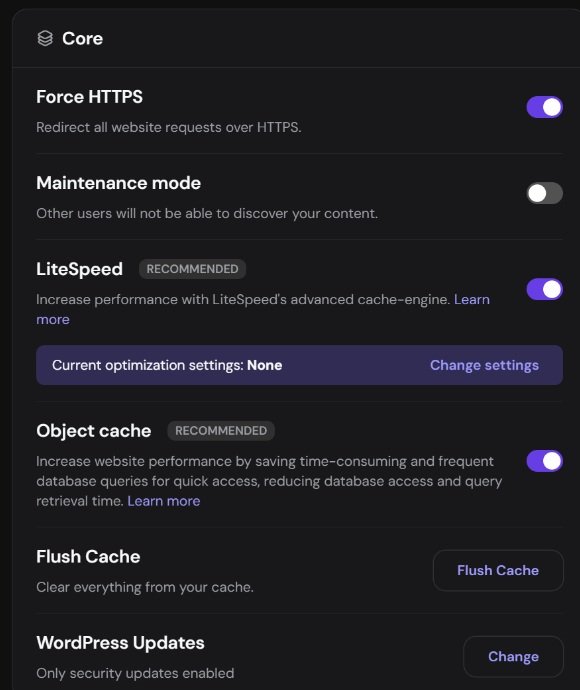
LiteSpeed was enabled on ProxVela, and hPanel also showed Object Cache as active. Object caching can reduce repeated database work by keeping frequently requested data available in memory instead of asking WordPress to regenerate it for every request.
One detail strengthened the usefulness of our performance test: Hostinger displayed Current optimization settings: None. We had not selected an aggressive Hostinger optimization preset immediately before testing.
Hostinger CDN and image optimization
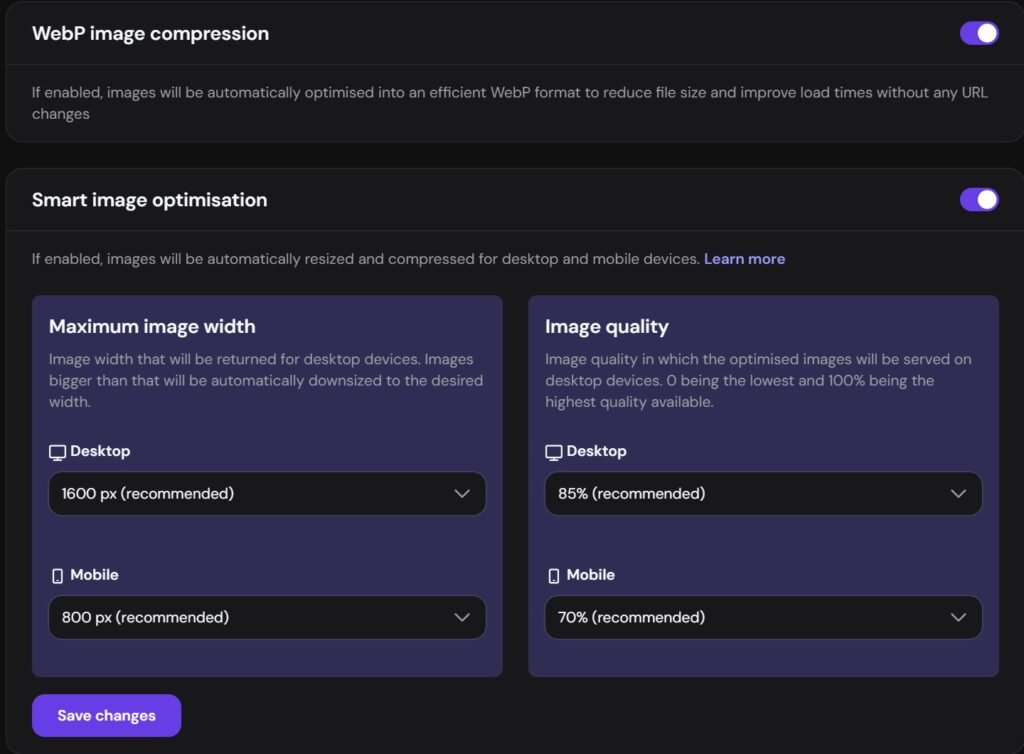
The Hostinger CDN was active during our test. Its controls included cache analytics, manual cache flushing, development mode, WebP compression, smart image optimization, IP and country blocking, security-level controls, and TLS settings.
WebP compression and Smart image optimization were both enabled. Hostinger also allowed separate image-delivery settings for desktop and mobile visitors.
For a screenshot-heavy review site, those separate mobile settings are useful because large desktop images do not need to be delivered unchanged to every phone.
Hosting resources and practical limits
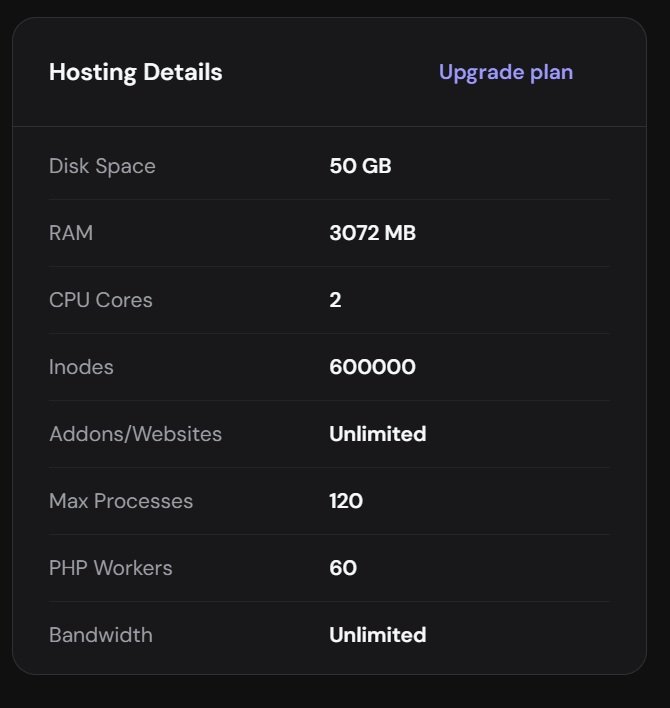
Our account displayed 50 GB of storage, 3 GB of RAM, 2 CPU cores, 600,000 inodes, 120 max processes, 60 PHP workers, unlimited websites, and unlimited bandwidth.
The “Unlimited” labels do not mean unlimited server capacity. CPU, RAM, process, PHP-worker, inode, storage, and fair-use limits still define the practical capacity of shared hosting.
Backups and recovery testing
Backups were one of the strongest parts of this Hostinger review because we could verify that restore points were actually being created.
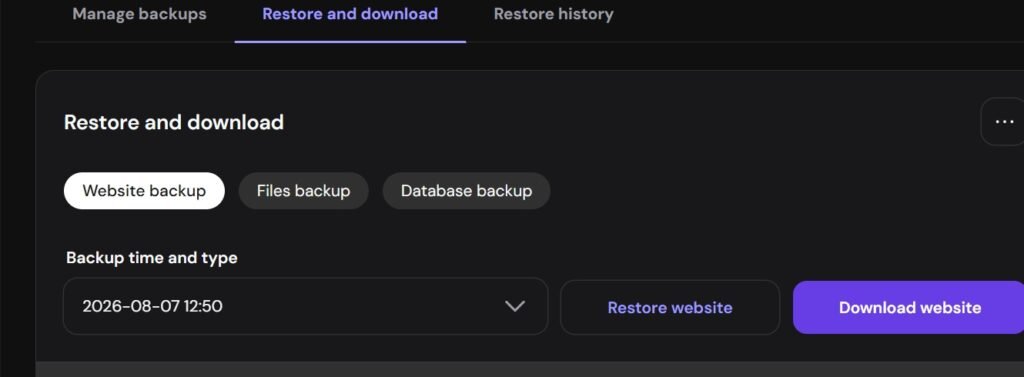
When we inspected the history on August 7, daily restore points were visible for August 7, August 6, August 5, August 4, August 3, August 2, August 1, July 31, and July 30. Because the hosting installation was new, that history does not prove Hostinger’s maximum retention period; it does confirm consistent daily backup creation throughout our observation window.
A manual backup option was also available once every 24 hours. The recovery interface separated Website backup, Files backup, and Database backup, and the full website backup included both Restore website and Download website.
Security, malware scanning, and SSL
The security portion of our Hostinger review produced both a positive result and an important limitation.
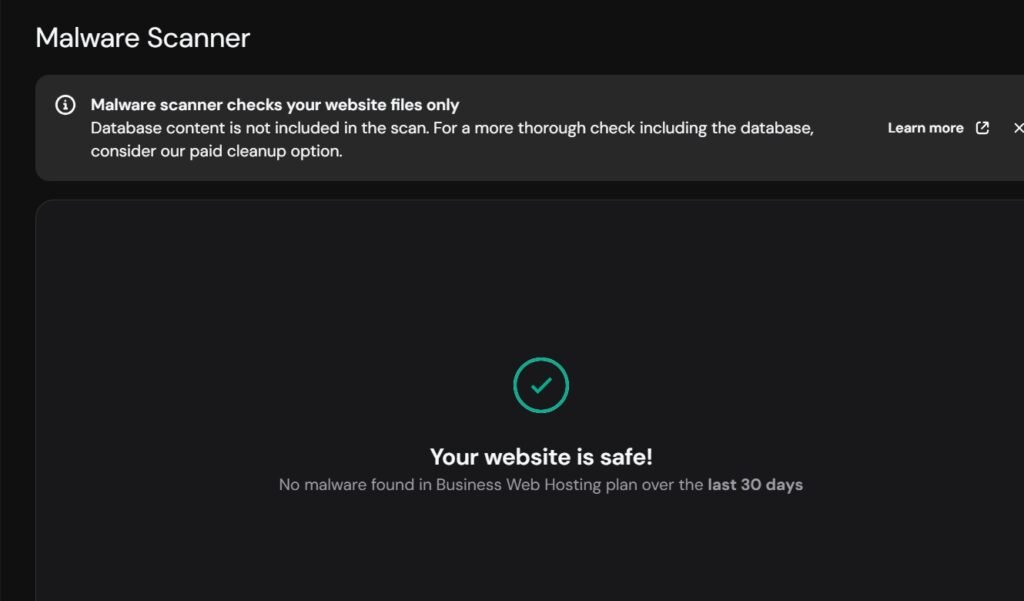
The malware scanner reported no malware during our test, and the dashboard showed no detected vulnerabilities. However, hPanel explicitly states that the standard malware scanner checks website files only and does not include database content.
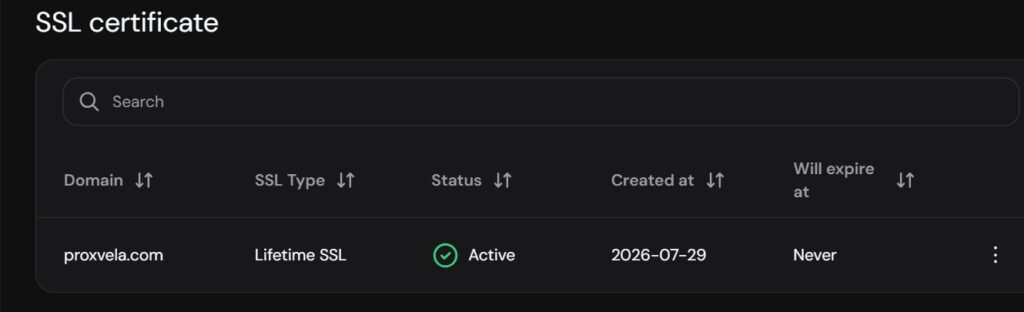
Our SSL management page showed an active Lifetime SSL certificate created on July 29, 2026, with the expiration field displayed as Never. Force HTTPS was also enabled.
Hostinger support: our real account question
We tested support with a genuine question rather than inventing an outage. We asked Hostinger to clarify why parts of our account used “Business Web Hosting” while we had also referred to the service as “Unlimited,” and to confirm several account features.
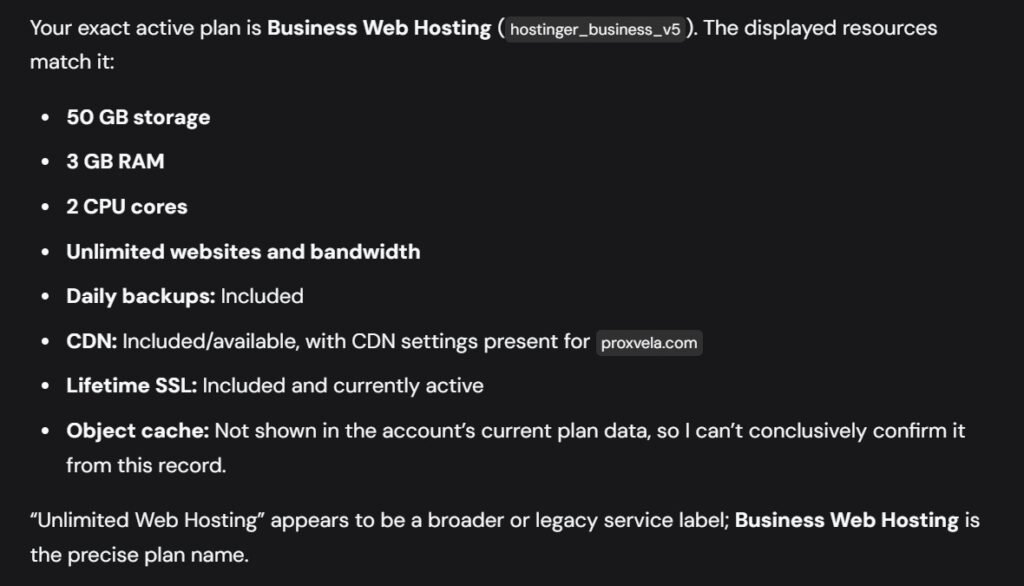
Kodee identified the backend plan as Business Web Hosting (hostinger_business_v5) and correctly repeated our 50 GB storage, 3 GB RAM, 2 CPU cores, unlimited websites, unlimited bandwidth, daily backups, CDN, and Lifetime SSL.
It could not conclusively confirm Object Cache from the plan-data record, even though we had independently verified that Object Cache was enabled on the WordPress installation. We preferred that limitation to an overconfident answer.
Hostinger review performance: How fast was WordPress?
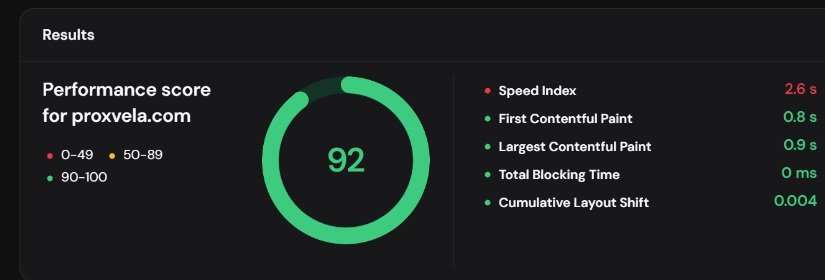
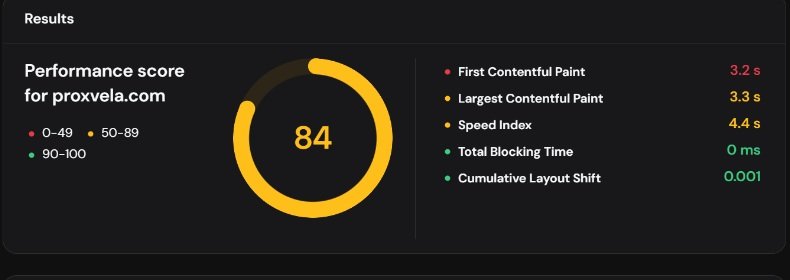
The performance portion of our Hostinger review used fresh desktop and mobile runs from Hostinger’s Page Speed interface on August 7, 2026.
The desktop result was excellent. An earlier desktop run reached 97/100, so we observed desktop scores in the 90s during this test period. Mobile performance was good but clearly weaker; an earlier mobile run scored 81/100 while the fresh result reached 84/100.
The main mobile weakness was initial content loading rather than blocking time or layout stability. Hostinger’s diagnostics also highlighted opportunities involving image delivery, unused CSS, render-blocking requests, and request dependencies.
Hostinger review pricing: Introductory offers and renewal cost
The pricing assessment in this Hostinger review separates the attractive promotional price from the much higher renewal rate.
When we fact-checked Hostinger’s public US web-hosting page on August 7, 2026, the following promotional and renewal prices were displayed. Prices can change by region, promotion, currency, and billing period.
Hostinger states that the displayed monthly amount is calculated from the prepaid plan total divided by the number of months. Its public web-hosting page also advertised a 30-day money-back guarantee when we checked.
Why our account showed both Business and Unlimited wording
Several hPanel screens displayed “Business Web Hosting,” while Hostinger’s public storefront also uses “Unlimited” as a plan name. Support identified our backend plan as Business Web Hosting (hostinger_business_v5) and described Unlimited Web Hosting as a broader or legacy label.
Because hosting companies can rename or restructure plans, compare the actual resources, included features, checkout total, and renewal terms in your own account rather than relying only on the plan label.
Who should use Hostinger?
Based on our Hostinger review findings, the strongest fit is a WordPress user who values integrated management tools and is willing to check the long-term renewal price before committing.
WordPress beginners
hPanel places backups, caching, CDN, SSL, updates, files, and performance controls in a relatively approachable interface.
Bloggers and affiliate websites
LiteSpeed, CDN delivery, device-specific image optimization, and daily backups fit content-heavy WordPress sites well. ProxVela itself is the use case we tested.
Small businesses
The integrated management approach can reduce the number of separate hosting services a small site owner needs to configure and maintain.
People managing several smaller websites
Our account displayed unlimited websites and bandwidth, subject to the practical resource limits and fair-use rules described above.
Who should look elsewhere?
Our Hostinger review also identified cases where another hosting approach may be a better fit.
Hostinger may be less attractive for users who want inexpensive month-to-month billing, dedicated server resources, a human-first support experience, or renewal pricing that remains close to the promotional offer. Large or highly dynamic websites should also compare cloud or VPS hosting instead of assuming shared hosting will remain suitable indefinitely.
Alternatives worth comparing
Before acting on this Hostinger review, compare alternatives that match your budget, support expectations, and resource needs.
- SiteGround: worth comparing for managed WordPress tooling and support.
- DreamHost: worth comparing for a different WordPress hosting and billing approach.
- Bluehost: a familiar beginner-oriented WordPress alternative with a different plan and control-panel structure.
- Cloudways: worth considering if you prefer managed cloud hosting rather than traditional shared hosting.
We did not test those alternatives using the same methodology for this article, so this is not a direct performance ranking.
Hostinger review verdict: Is it worth it?
This conclusion follows ProxVela’s published review methodology. You can also browse the technology reviews library and read our affiliate disclosure.
Yes—for WordPress beginners, bloggers, affiliate websites, and small businesses that want useful hosting tools consolidated into one dashboard.
Hostinger’s strongest results in our test were desktop performance, daily backups, CDN and image optimization controls, SSL management, and the amount of WordPress functionality built into hPanel.
The main weaknesses were the much higher renewal price, slower mobile loading than desktop, the file-only scope of the standard malware scanner, and an AI-first support experience.
We recommend Hostinger most strongly when convenience and integrated WordPress management matter, provided the buyer checks the long-term renewal price before committing to a multi-year promotional term.
Strong WordPress hosting with excellent desktop performance and practical built-in management and recovery tools, tempered by renewal pricing and a few security and support limitations.
Frequently asked questions
These Hostinger review FAQs summarize the most important findings from our testing.
Is Hostinger good for WordPress?
Yes, based on our hands-on test. Our WordPress installation had LiteSpeed, Object Cache, CDN, daily backups, SSL, and WordPress management controls available through hPanel.
How fast was Hostinger in our test?
Our fresh August 7 test scored 92/100 on desktop and 84/100 on mobile. Desktop LCP was 0.9 seconds, while mobile LCP was 3.3 seconds.
Does Hostinger provide daily backups?
Daily automatic backups were active on our account, and we verified multiple dated restore points. A manual backup option and separate website, file, and database recovery paths were also available.
Can I download a Hostinger backup?
Yes. The full website backup interface included a Download website option as well as Restore website.
Does Hostinger include SSL?
Our ProxVela domain showed an active Lifetime SSL certificate, and Force HTTPS was enabled.
Does Hostinger include a CDN?
Yes. Hostinger’s CDN was active on our site and included analytics, cache management, image optimization, traffic controls, and security settings.
Does Hostinger have Object Cache?
Object Cache was enabled on our WordPress installation. Hostinger support could not conclusively confirm it from the plan-data record itself, so our statement is limited to what we directly observed in hPanel.
Does Hostinger scan for malware?
Yes. The scanner reported no malware during our test. However, Hostinger states that the standard scan checks website files only and does not include database content.
Is Hostinger really unlimited?
Our account displayed unlimited websites and bandwidth while also displaying CPU, RAM, process, PHP-worker, inode, and storage limits. Unlimited therefore does not mean unlimited server capacity.
Why did our account show both Business Web Hosting and Unlimited?
Hostinger support identified our backend plan as Business Web Hosting (hostinger_business_v5) and described Unlimited Web Hosting as a broader or legacy label. Hostinger also currently uses Unlimited as a public plan name, so compare the resources and billing terms shown in your own account.
Does Hostinger have a money-back guarantee?
Hostinger’s public web-hosting page advertised a 30-day money-back guarantee when we fact-checked this Hostinger review on August 7, 2026. Verify the current terms before purchasing.
Sources and testing records
Public product and pricing facts were checked against Hostinger’s official web-hosting information. The performance scores, resource allocations, CDN settings, image-optimization settings, backup history, SSL status, malware-scan result, and support observations are from ProxVela’s original testing.
- Hostinger web-hosting plans and pricing
- ProxVela review methodology
- ProxVela editorial policy
- ProxVela affiliate disclosure
Tested: August 7, 2026 · Last fact-check: August 7, 2026