

Pros
- Created our basic form without code
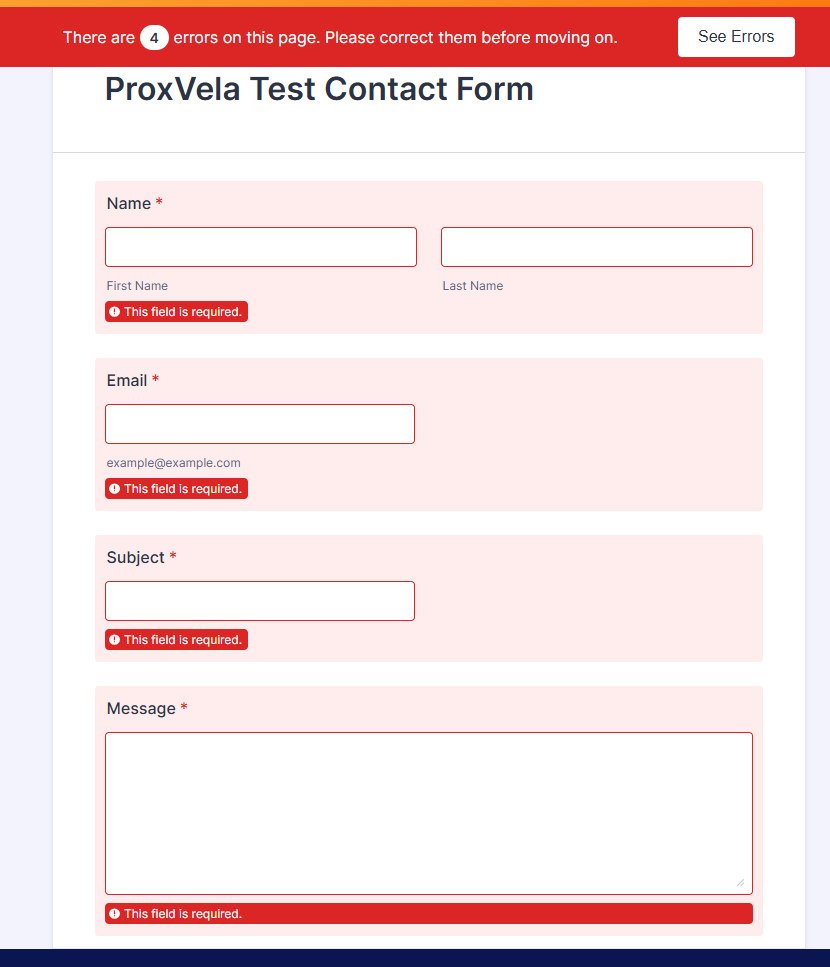
- Required-field and email-format error messages worked
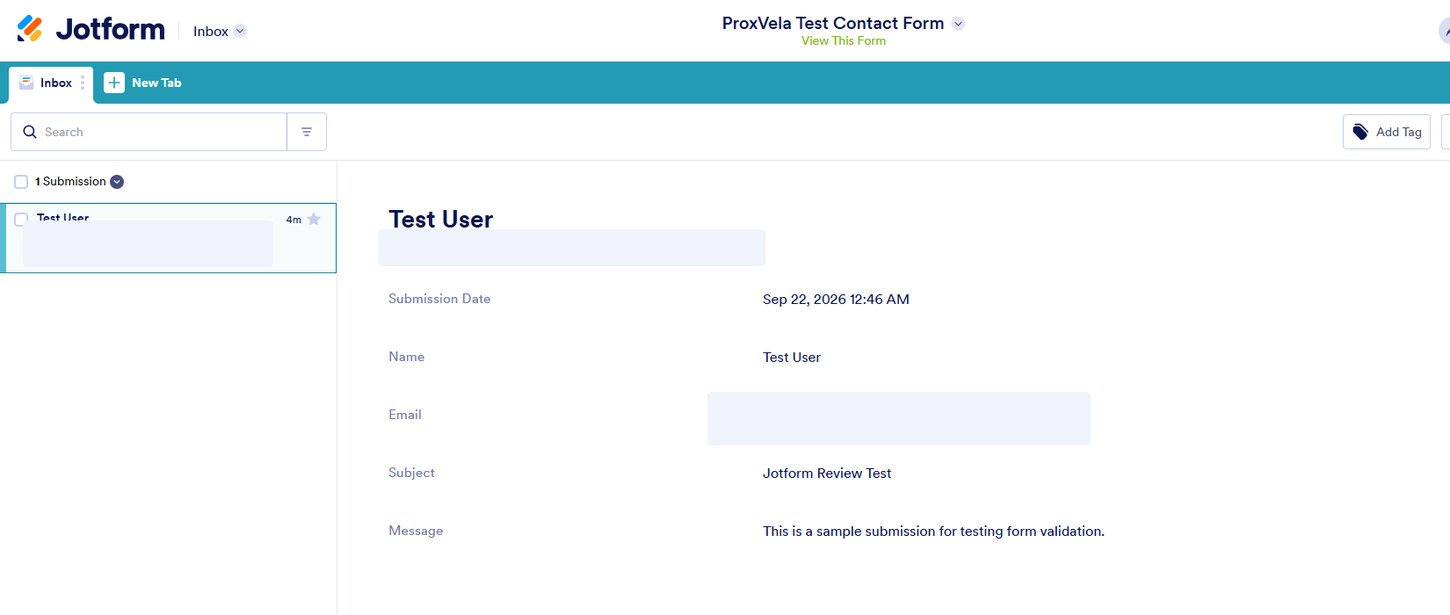
- One valid response reached Inbox with all expected values
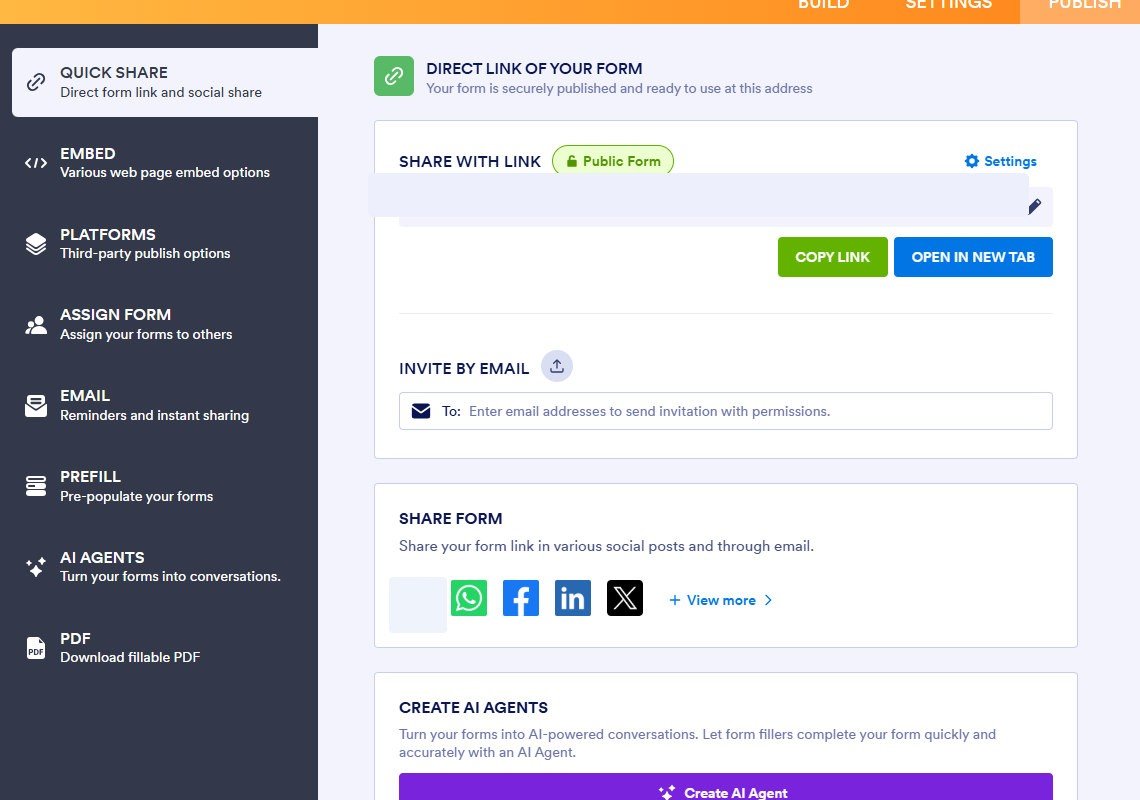
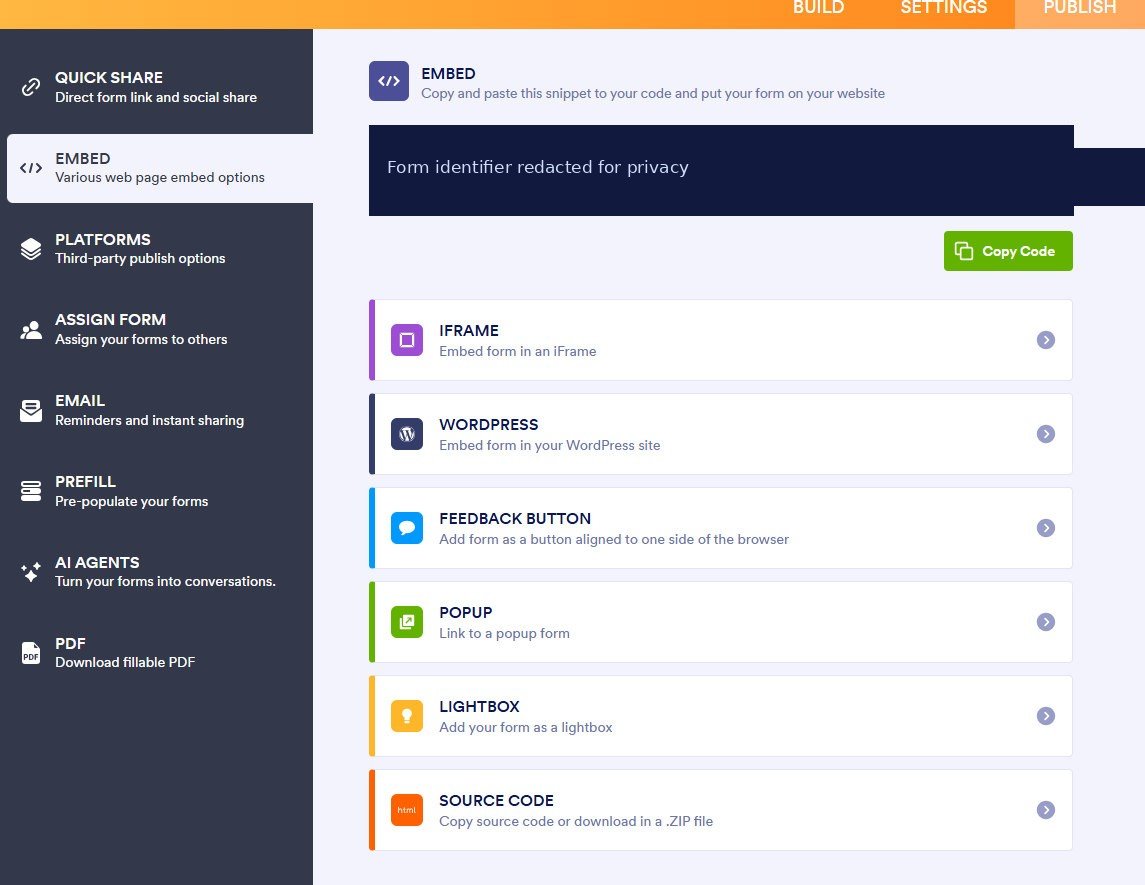
- Direct sharing and multiple embed methods were visible
- Starter let us run the core test without paying
Cons
- −Only five active forms and 100 monthly submissions on Starter
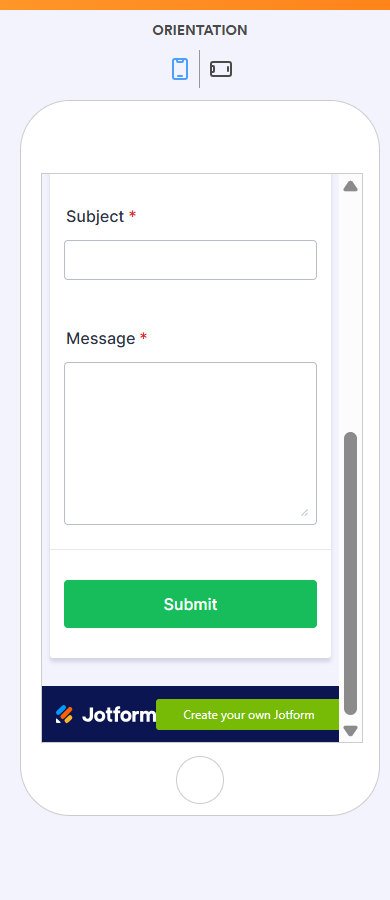
- −Jotform branding stays visible on free forms
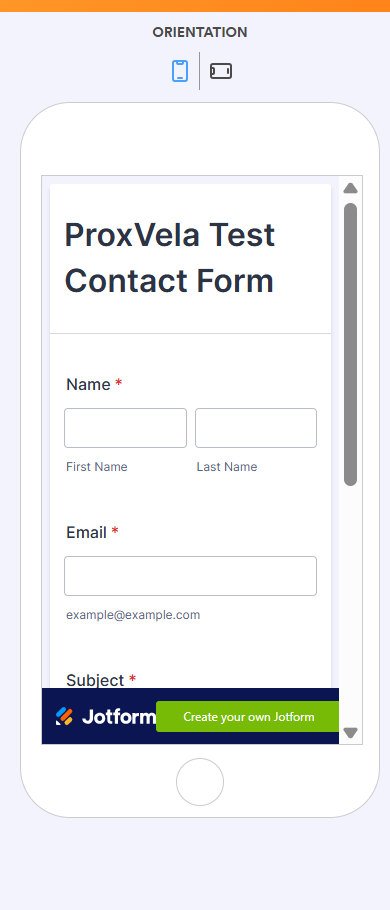
- −Side-by-side name fields look narrow in the simulated phone view
- −Account sale and public pricing use different reference rates
- −WordPress integration, export, notifications and heavy load were not tested
Testing and affiliate disclosure: ProxVela independently created a free Jotform account and tested the workflow described here on September 21–22, 2026. Jotform did not sponsor this review, provide paid access, or approve its conclusions. Our At a Glance button links to Jotform’s official website, not an affiliate-tracking URL; we will update this statement if an approved affiliate relationship and link are added. We used dummy data, and the published evidence screenshots obscure the test address and form URL. Read our review methodology and editorial policy.
Jotform review 2026: We built a four-field contact form on Jotform Starter, attempted two deliberately invalid submissions, sent one successful test response and found it in the Inbox. We also inspected the simulated phone layout, sharing tools, embedding options and prices shown in our account. Here is what our free-plan test established—and what it did not.
Our test was intentionally small and repeatable. We did not pay for a plan, connect Jotform to ProxVela’s live WordPress site, send real customer data, test email-delivery notifications, export a spreadsheet, benchmark traffic, or audit security. A working contact form is evidence of that workflow, not a guarantee about every Jotform product.
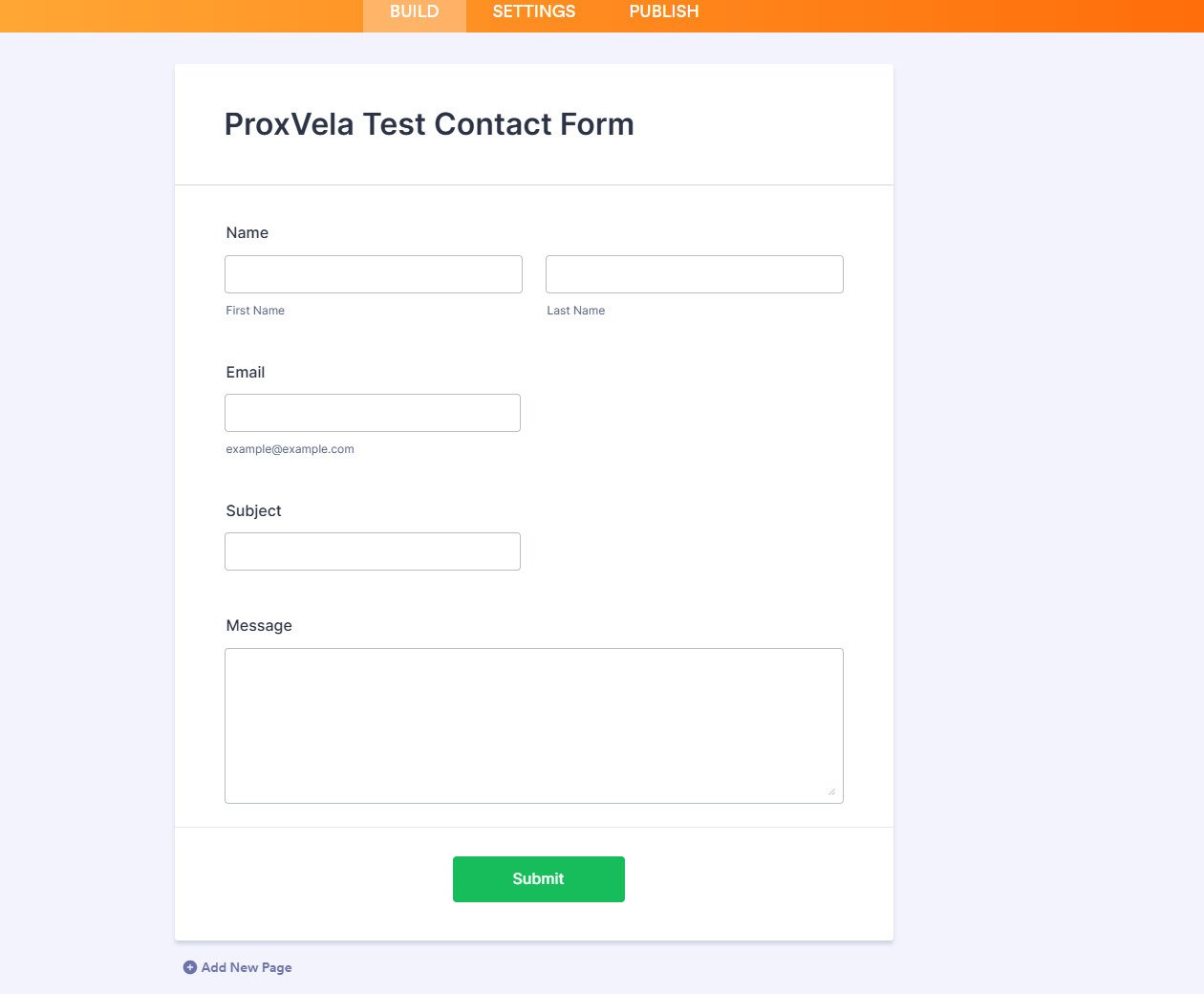
- Starting from scratch, we built a classic contact form with Name, Email, Subject and Message, without writing code.
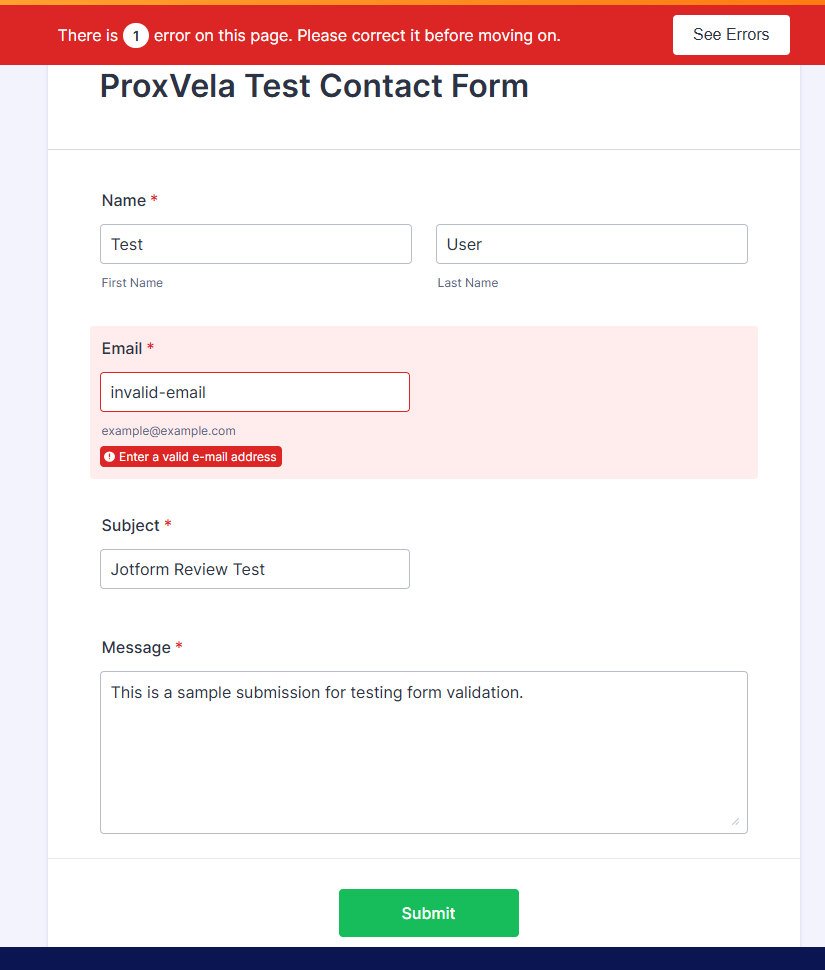
- Submitting it empty produced four highlighted required-field errors; entering
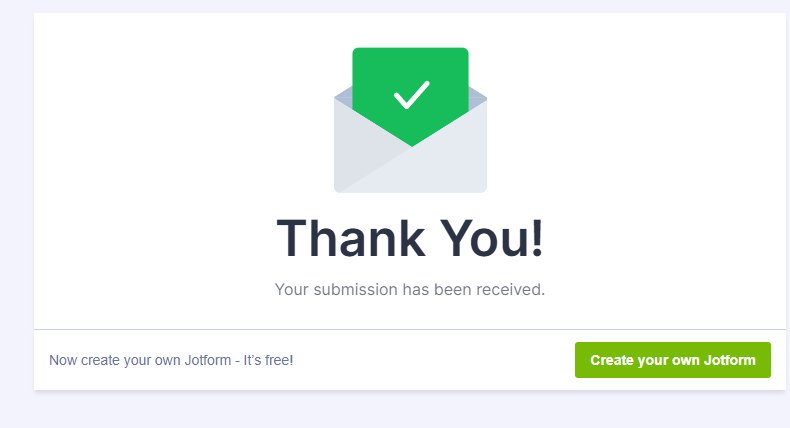
invalid-emailproduced one targeted email-format error. - A completed test returned a thank-you screen and appeared in Jotform Inbox with the expected fields and a submission timestamp.
- The simulated phone layout fit inside its preview, but the side-by-side name fields were narrow and Jotform branding remained prominent.
- The Publish area generated a link and JavaScript snippet and displayed several embed choices; live WordPress integration was not performed.
Jotform review 2026: overview and testing setup
Jotform is a no-code form platform used for contact forms, event registrations, questionnaires and other data-collection tasks. It also advertises products such as Tables, Sign, Apps, Workflows and AI Agents. Those additional products appeared in onboarding and creation screens; we did not interpret their availability as proof that we had tested their behavior.
We signed up with a separate testing email and used ProxVela Test Contact Form as our sample project. The setup asked about use case, role, industry, company and tools. We reached the workspace without being asked for a physical postal address in this signup sequence. That observation applies only to our experience, not to every account or later verification step.
Features: what we actually tried on the free plan
Building a form manually
After choosing Create → Form, Jotform offered AI-assisted generation, starting from scratch, importing a form, converting a document, collecting signatures and templates. We deliberately selected Start from scratch to assess the manual editor, followed by Classic form, which puts all questions on one page. A Card form layout, showing one question at a time, was visible but not tested.
The left Form Elements panel offered built-in Name and Email controls, plus Short Text and Long Text. We dragged Name and Email into the canvas, used Short Text for a Subject question and Long Text for Message. There was no dedicated Subject element in our visible list; renaming Short Text worked. The editor reported that our changes were saved. A first-time organization-settings popup appeared, but no logo upload was needed for this test.
Overall, constructing a small contact form was a straightforward manual process once we identified the appropriate generic text field. A more complex, multi-page or logic-driven form could expose different friction; we did not test one.
Required fields: four errors, not a silent failure
We marked Name, Email, Subject and Message as required. Red asterisks appeared next to every field. With the preview open, we clicked Submit while leaving all four blank. Jotform blocked the attempt, displayed a red banner reporting four errors, highlighted each missing field and showed individual required-field messages. This was an observed result, not merely a saved configuration.
Email formatting: invalid input was rejected
Next, we filled the other fields and entered invalid-email as the email value. This time, Jotform showed one error, highlighted only Email and asked for a valid email address. That verifies basic format checking within the tested form; it does not verify that an email address exists, can receive mail or belongs to the respondent.
Successful submission and confirmation
After replacing the bad email with a properly formatted test address, we submitted the same form. Jotform displayed a thank-you screen stating that the submission had been received. This was the expected positive path, but a success page alone cannot show whether the account owner can retrieve the data, so we checked Inbox separately.
Inbox: the saved response matched what we submitted
In Jotform Inbox we found one submission under the test user’s name. The saved record displayed the submission timestamp along with Name, Email, Subject and Message, matching the values we entered. That completed our basic end-to-end trace from form builder to validation to receipt and storage.
We saw a suggested CSV-export action in the Inbox interface, but did not click it or inspect an exported file. Our positive result concerns visibility and content of one saved record, not export integrity, retention behavior or collaborative handling of many submissions.
Mobile preview: usable in simulation, with two visual compromises
We selected Jotform’s built-in Phone preview and inspected the top and bottom of our form. The title, labels, fields and Submit button were visible after normal vertical scrolling, with no obvious horizontal overflow in the simulator. However, First Name and Last Name remained side by side, creating two narrow text inputs. The persistent Jotform footer also took a conspicuous portion of the compact viewing area.
These are simulated-preview observations only. We did not open the live form on a physical iPhone or Android device, test on-screen keyboards, or compare browsers; we therefore do not claim verified real-device responsiveness.
Sharing and embedding: options visible, WordPress not installed
The Publish panel labeled our form a Public Form and generated a direct link with Copy Link and Open in New Tab controls. Email invitations and social/QR sharing were also shown. We did not put the link on ProxVela or invite other people to complete this test form.
Under Embed, we saw a generated JavaScript snippet plus options labeled iframe, WordPress, Feedback Button, Popup, Lightbox and Source Code. This establishes that the options were presented and code was generated. We did not copy it into WordPress, install a Jotform plugin or test page speed after embedding. A live-site compatibility verdict would require that separate test.
Other functions visible, but outside our test
We saw form styling controls and links to AI Agents, Apps, Sign and Workflows, but we did not execute an AI task, process a payment, send an automated email, export submissions, customize a full theme or test e-signature workflows. Jotform’s official plan comparison and product site describe these broader offerings. Their presence in a menu is not a hands-on performance result.
Performance and practical reliability: our measured scope
Our functional results were positive for a single short form: two intentionally invalid attempts were blocked, one valid attempt showed a confirmation page, and the matching record appeared in Inbox. The interface also displayed automatic-save feedback as we edited. No blocking error arose in those actions.
| Check | Result | Evidence limit |
|---|---|---|
| Manual form creation | Completed | One four-field Classic form |
| Required-field validation | Passed | One empty attempt, four flagged fields |
| Email-format validation | Passed | One deliberately malformed address |
| Successful response | Confirmed | One accepted submission and thank-you page |
| Stored response | Confirmed | One matching record in Inbox |
| Phone rendering | Preview inspected | No physical-device test |
| WordPress embed | Options inspected | No installation or live page-load measurement |
| Support, delivery, bulk load, security | Not tested | No score or performance claim |
We cannot infer uptime, delivery rates, response times, spam protection effectiveness or large-scale reliability from these checks. Readers collecting critical information should also monitor their storage and submission allowances and establish an export or backup workflow appropriate to their needs.
Jotform pricing in 2026: free limits and the sale we saw
The Starter plan was free in our account. The pricing page we opened displayed a prominent limited-time 50% promotion and a countdown. Its crossed-out reference prices were Bronze $39, Silver $49 and Gold $129 per month, and the offer showed $19.50, $24.50 and $64.50 as monthly equivalents, billed annually. These figures reflect that specific screen on September 22, 2026, not a guaranteed offer for every visitor.

Jotform’s separate publicly accessible pricing page also displayed annual-billing figures of approximately $34 Bronze, $39 Silver and $99 Gold per month when we checked it for this review. Different campaigns, billing toggles and account states can produce different price displays. Verify the amount due, renewal price and eligibility in your own checkout. We did not purchase a plan or confirm the sale’s final checkout total.
| Plan | Our 50% sale screen | Other public annual-billing display | Forms / monthly submissions |
|---|---|---|---|
| Starter | Free | Free | 5 / 100 |
| Bronze | $19.50/mo equivalent | $34/mo equivalent | 25 / 1,000 |
| Silver | $24.50/mo equivalent | $39/mo equivalent | 50 / 2,500 |
| Gold | $64.50/mo equivalent | $99/mo equivalent | 100 / 10,000 |
| Enterprise | Custom quote | Custom quote | Contact sales |
Promotion caution: Jotform says certain temporary sale discounts are for upgrades to annual plans and renewals return to the full price. Treat a discounted monthly equivalent as a comparison figure, not permission to assume monthly billing at that rate. Confirm payment terms before buying.
The free plan’s meaningful constraints
According to Jotform’s Starter documentation, the free account provides five active forms, 100 submissions per month across all forms, 100 MB of file space, 500 total stored submissions and up to 100 fields per form. Branding stays on forms. The documentation also lists limits for payment submissions and signed documents, which we did not use. Some published help pages and pricing views show different monthly form-view allowances, so check the Usage screen for your account instead of relying on a single historic figure.
The cumulative limits matter: if one website uses a contact form, a registration form and a campaign survey, their entries count toward the same 100-submission monthly allowance. Jotform’s official information explains that reaching a usage cap may require waiting for the reset or upgrading. We did not attempt to hit a cap.
Paid tiers increase forms and submissions and remove Jotform branding. The Gold and Enterprise materials also discuss HIPAA-enabled options; we did not activate them or carry out a compliance audit. Do not assume a free form has a particular regulatory certification just because the pricing page advertises an advanced option on higher plans.
Who should compare Jotform with their needs?
Our evidence is most relevant to someone who needs a standard contact or feedback form and expects relatively modest response volume. Such a user can reproduce our creation, validation and Inbox workflow without buying a plan. They still need to decide whether visible vendor branding fits their public website.
If your project requires dozens of forms, large campaigns, complex integrations, paid-only styling or a very high submission allowance, our one-form free account cannot prove that Jotform will meet those requirements. Check the actual entitlement for your selected tier and test the specific workflow before committing.
Jotform alternatives to compare
These are descriptive alternatives, not matched head-to-head tests. We did not sign up for or benchmark these platforms as part of this Jotform experiment.
| Tool | Why consider it? | What has not been established here? |
|---|---|---|
| WPForms | A WordPress-native plugin. Official documentation explains that Lite sends submission information by email; optional Lite Connect keeps encrypted backups for later restoration after a paid upgrade. | We did not test its installation, notifications or backup process in this article. |
| Tally | Document-like form editing and unlimited free forms and submissions under fair-use guidelines, according to Tally. | We did not measure fair-use thresholds or compare form design in a matched test. |
| Typeform | Question-by-question interaction; its official free-plan guide describes 10 responses per month across forms. | We did not test user completion rates or real mobile behavior. |
Compare the number of responses you actually expect, where records are stored, how forms look on your devices, branding requirements and exact plan costs. Different free tiers are not directly interchangeable.
Our Jotform review conclusion
Jotform successfully completed the limited workflow we gave it: we built a four-field contact form, blocked a blank submission, rejected an invalid email, submitted valid test data and retrieved the matching record from Inbox. The editor did not require coding, and the Publish section provided link and embedding choices without needing a live website connection for our inspection.
There are visible trade-offs. The Starter allowance is five forms and 100 monthly submissions, branding remains prominent, and the simulated phone preview kept name fields narrow. We also encountered different pricing presentations across a time-limited account offer and other publicly displayed annual rates. We would not extrapolate this successful single submission into a claim about large-scale speed or reliability.
Our judgment of a basic free-plan contact-form workflow, calculated from five transparent dimensions below. This is not a score for AI Agents, payments, support, real-device mobile performance, high traffic or security, which we did not test.
Jotform review: frequently asked questions
Is Jotform free to use?
Yes. Our Starter account let us create and submit one contact form without paying. Free usage is limited: five active forms and 100 submissions per month across the account, plus storage and other allowances.
Does Jotform save submissions on its free plan?
Our one completed test response appeared in Jotform Inbox with its name, email, subject, message and timestamp. We did not test long-term retention, exports or larger data sets.
Does Jotform check required fields and email format?
In our tests, an empty form generated four required errors and the string invalid-email generated a targeted formatting error. This does not establish mailbox existence or spam protection.
Can you embed a Jotform form in WordPress?
The Publish → Embed screen provided a WordPress option alongside JavaScript and iframe. We inspected but did not deploy the integration on ProxVela, so theme compatibility and page speed remain untested.
How many forms and submissions are free?
Jotform’s Starter documentation lists five active forms and 100 monthly submissions shared across the account, not 100 per form. It also lists 500 stored submissions and 100 MB of file space.
Can free users remove Jotform branding?
Jotform’s plan information describes branding removal as a paid-plan feature. We observed the branded footer in our desktop and simulated-phone previews.
What about the 50% sale shown in our screenshots?
That was a time-limited account offer with annual-billing monthly equivalents. Jotform also displayed different standard annual rates in other pricing contexts. Check the current checkout, up-front total and renewal terms before buying.
Did ProxVela test AI, payment processing or customer support?
No. We saw these capabilities promoted but did not execute their workflows, buy a plan or contact support. They are deliberately excluded from our hands-on assessment.
Sources and original evidence
Our screenshots above document direct actions from September 21–22, 2026. The sources below are official product, plan and comparison references, not substitutes for the hands-on evidence. Pricing, usage rules and product features may change.
- Jotform pricing, plan conditions and sale terms
- Jotform support: Starter features and limits
- Jotform official affiliate agreement (program exists; no ProxVela tracking link used)
- Tally pricing and fair-use language
- Typeform official free-plan limits
- WPForms official Lite Connect entry-backup documentation
Hands-on testing: September 21–22, 2026 · Product facts reviewed: September 22, 2026 · Evidence: original ProxVela screenshots with test email/link redactions · No payment or live-site integration.