

Pros
- Straightforward WordPress installation and connection
- Reliable visitor-to-agent chat workflow
- Flexible pre-chat forms and custom fields
- Separate desktop and mobile widget settings
- Away-mode messages can still be delivered and answered by email
- Useful basic reports with heatmaps and CSV export
- Mobile Lighthouse remained 98 in our enabled test
Cons
- −Per-agent pricing becomes expensive as teams grow
- −Advanced reporting requires the Business tier
- −Meaningful third-party network payload in our Lighthouse tests
- −Desktop Speed Index increased substantially in our enabled run
- −AI and human support initially gave incorrect plan-entitlement information
- −White-label branding requires a higher tier
Testing disclosure: LiveChat did not sponsor, review, or approve this article. ProxVela independently installed and tested LiveChat on a fresh local WordPress environment on August 15, 2026. Our visitor names, emails, products, and support scenarios were created for testing and did not contain real customer data. See our review methodology and editorial policy.
This hands-on LiveChat review examines WordPress installation, real visitor-to-agent messaging, widget customization, mobile behavior, forms, offline messaging, reporting, performance, pricing, and support accuracy.
We tested the official WordPress integration on a clean Local site, used the 14-day Team trial, created real test conversations, imported ProxVela as a Knowledge Hub source, verified reply suggestions and away-mode behavior, compared Lighthouse results with LiveChat enabled and disabled, and challenged both AI and human support with a plan-entitlement question.
Overview: What is LiveChat?
LiveChat is a customer communication platform built around real-time website chat. It provides an agent workspace, visitor details, chat forms, campaigns, reports, website-widget customization, knowledge sources, reply suggestions, and integrations for websites including WordPress.
For this LiveChat review, we focused on the product as a practical WordPress support and sales tool rather than judging it only by its marketing feature list. The key question was whether the visitor experience, agent workflow, customization controls, reporting, and performance justify its per-agent pricing.
LiveChat review methodology: How we tested it
We created a fresh Local WordPress site specifically for this review so the widget could be installed, customized, disabled, and retested without affecting the live ProxVela website.
Our screenshots and measurements in this review come from that controlled environment. Results can differ on other hosts, themes, devices, and plugin stacks.
Installation and onboarding
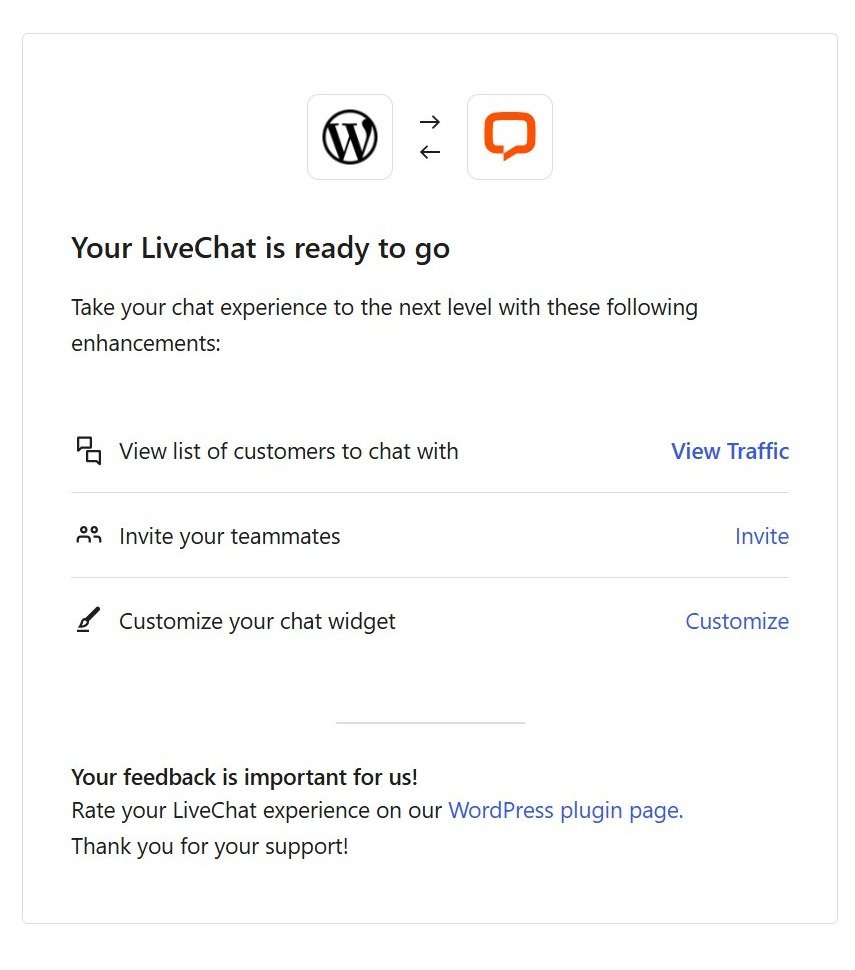
We installed the official LiveChat plugin through the WordPress dashboard and connected it to a new LiveChat account. Once connected, WordPress displayed a confirmation page with shortcuts for traffic, teammate invitations, and widget customization.
The onboarding process then guided us through website details, channels, company size, and optional teammate invitations before opening the agent workspace. We did not need to manually paste the LiveChat script because the WordPress plugin handled the connection.
Features, real chat workflow, and customization
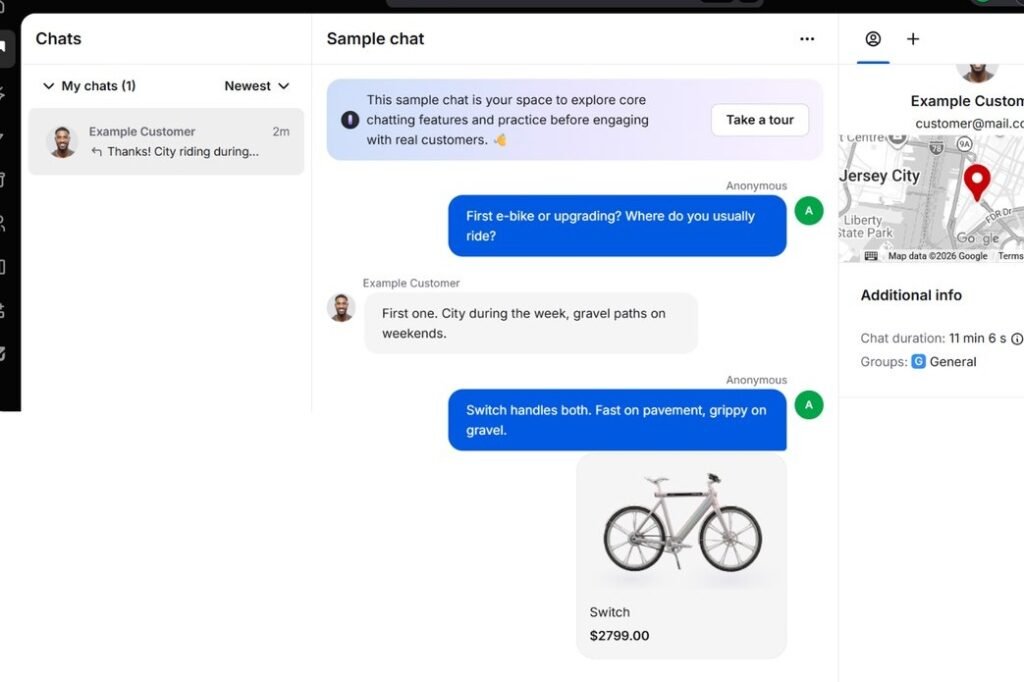
Our feature testing covered the complete visitor-to-agent path rather than stopping at the dashboard. Messages from the website appeared in the LiveChat workspace with visitor information, visited-page context, chat duration, group data, and a response composer.
Real visitor-to-agent chat
We used LiveChat’s sample workspace and then a real visitor session on our local WordPress site. Messages were delivered to the agent interface, and manual replies returned to the visitor widget as expected.
Knowledge Hub and reply suggestions
We imported https://proxvela.com as a public website source in LiveChat’s Knowledge Hub. The account reported 34 indexed pages, and we enabled automatic source refresh every 30 days.
After that source was available, the agent workspace generated a reply suggestion to a visitor asking about ProxVela’s Hostinger review. The suggestion accurately summarized our published performance findings and major strengths and drawbacks. We treated this as an agent-assistance test, not as proof that every generated response will always be correct.
Desktop and mobile widget customization
LiveChat allowed us to change widget appearance, colors, minimized style, desktop position, spacing, logo and agent-photo visibility, sound notifications, ratings, transcripts, and separate mobile behavior.
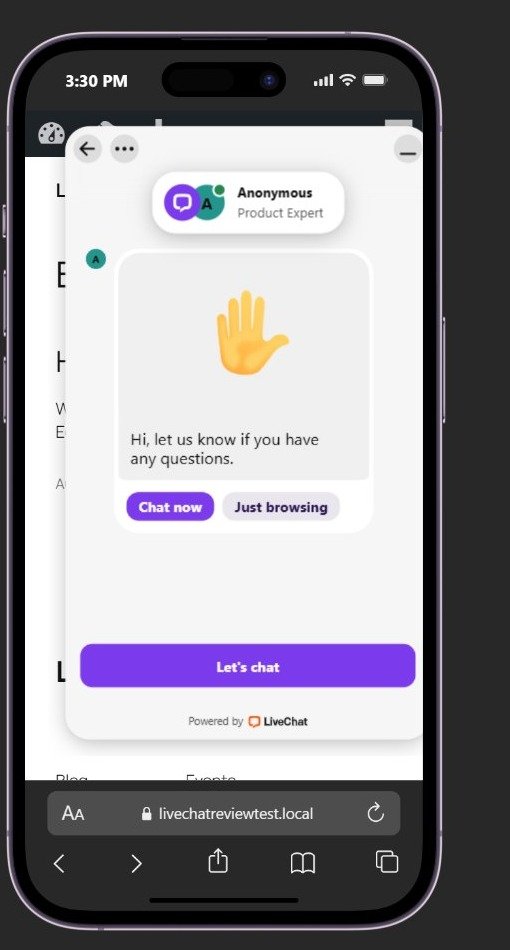
We specifically tested independent responsive positioning. Desktop was left-aligned while mobile was changed to the right with separate side and bottom spacing. The mobile browser view confirmed that the mobile-only position applied without changing the desktop configuration.
Pre-chat forms and custom fields
The pre-chat form could be enabled or disabled, reordered, and extended beyond basic Name and Email fields. The available element types in our account included Information, Name, Email, Question, Choice list, Dropdown, Multiple choice list, and Group selection.
We added a custom question — “What can we help you with?” — and verified that it appeared on the actual visitor widget before chat started.
Away mode and offline messaging
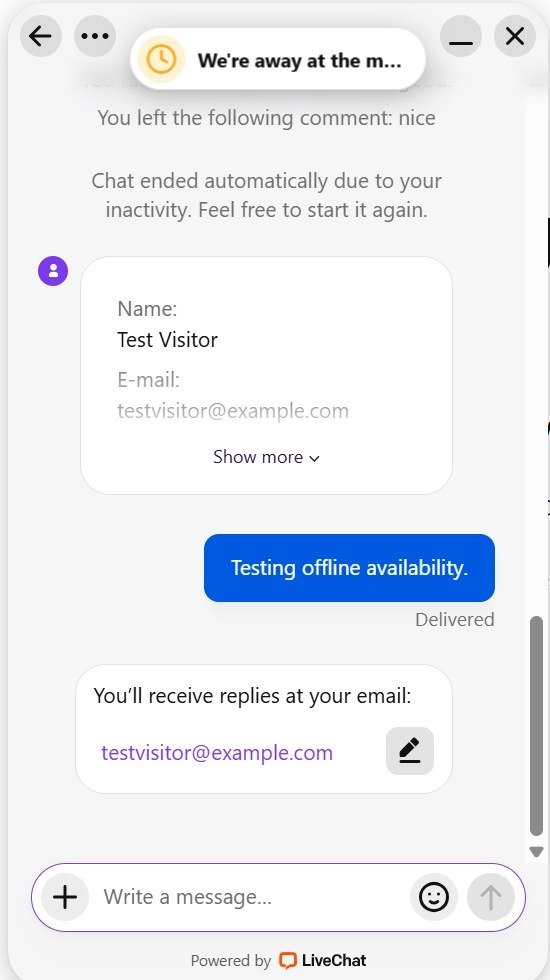
With availability set to Always and the agent marked away, a visitor could still send a message. The widget displayed an away notice, marked the message as delivered, and told the visitor that replies would be sent to their email address.
Ratings, transcripts, and welcome-screen controls
Additional widget controls in our Team trial included customer sound notifications, agent ratings, chat transcripts, logo display, agent photo display, welcome-screen content, custom links, and marketplace integrations. White-label branding appeared reserved for a higher tier.
Performance: Does LiveChat slow down WordPress?
We ran Lighthouse against the same local WordPress homepage with LiveChat enabled and then with the plugin disabled. We used matched desktop and mobile configurations so the comparison reflected LiveChat’s incremental cost on this simple test site.
| Metric | LiveChat OFF | LiveChat ON | Change |
|---|---|---|---|
| Desktop performance | 100 | 91 | -9 points |
| Desktop FCP | 0.3 s | 0.3 s | No change |
| Desktop LCP | 0.3 s | 0.4 s | +0.1 s |
| Desktop TBT | 0 ms | 0 ms | No change |
| Desktop CLS | 0 | 0 | No change |
| Desktop Speed Index | 0.3 s | 3.7 s | +3.4 s |
| Desktop transfer | ~92 KiB | ~681 KiB | +~589 KiB |
| Mobile performance | 100 | 98 | -2 points |
| Mobile FCP | 0.6 s | 1.1 s | +0.5 s |
| Mobile LCP | 1.4 s | 2.4 s | +1.0 s |
| Mobile TBT | 0 ms | 50 ms | +50 ms |
| Mobile CLS | 0 | 0 | No change |
| Mobile Speed Index | 0.8 s | 1.3 s | +0.5 s |
| Mobile transfer | ~92 KiB | ~457 KiB | +~365 KiB |
The clearest drawback was extra third-party network weight. Desktop transfer grew by roughly 589 KiB in our run, while mobile grew by roughly 365 KiB. The desktop Speed Index also increased sharply.
The positive result was responsiveness and stability: desktop Total Blocking Time remained 0 ms, mobile TBT was 50 ms, and CLS stayed at 0 in both enabled runs. The mobile Lighthouse score still reached 98 under the emulated mobile test.
Reporting: useful basics, higher-tier gates
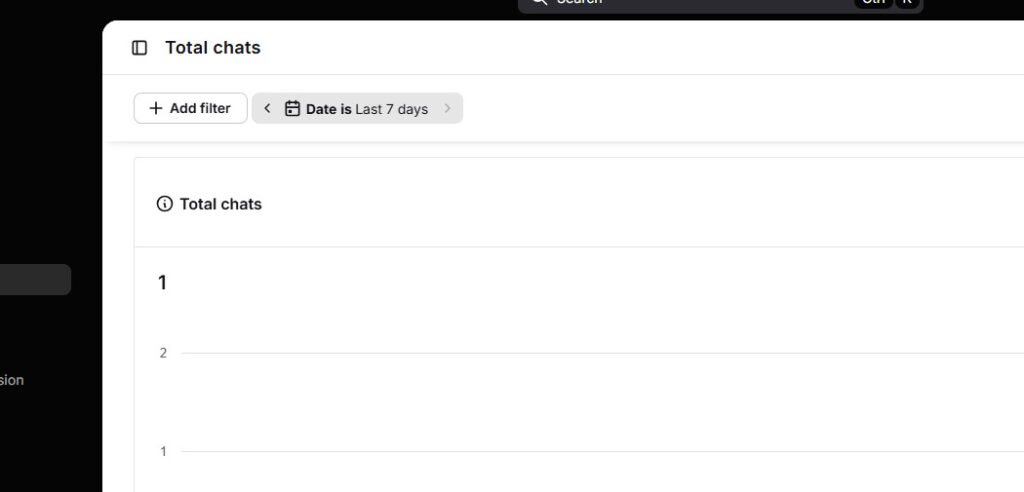
The Team trial exposed a useful reports area with Total Chats, Chat Engagement, Missed Chats, Campaigns Conversion, Tags Usage, Chat Satisfaction, Chat Availability, Chat Forms, and other sections. The Total Chats report included filters, a daily chart, a heatmap, and CSV export.
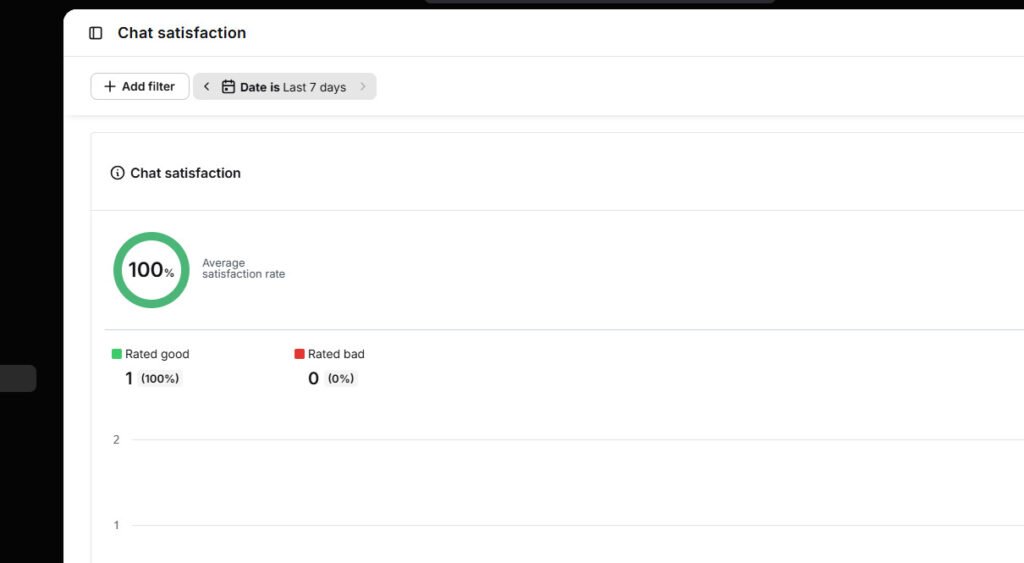
Our single submitted positive rating appeared in Chat Satisfaction as a 100% average satisfaction rate: one rated-good chat and zero rated-bad chats. Because this was only one controlled test rating, the 100% figure should not be interpreted as a general customer-satisfaction benchmark.
One important plan limit appeared when we opened Chat Duration. The Team trial displayed an upgrade screen. LiveChat support later confirmed that Chat Duration reporting requires the Business plan.
Pricing: Team is capable, but per-agent cost adds up
When we checked the subscription screen on August 15, 2026, LiveChat showed Starter, Team, Business, and Enterprise tiers. Our 14-day trial was explicitly marked as Team.
| Plan | Monthly billing | Annual billing equivalent | Key positioning shown |
|---|---|---|---|
| Starter | $25/agent/mo | $19/agent/mo | Essentials, basic customization, 60-day chat history |
| Team | $59/agent/mo | $49/agent/mo | Full widget customization, unlimited campaigns/history, basic reporting |
| Business | $89/agent/mo | $79/agent/mo | Advanced/on-demand reporting, agent performance, scheduling and staffing tools |
| Enterprise | Custom | Custom | White label, SSO, HIPAA, dedicated onboarding and account management |
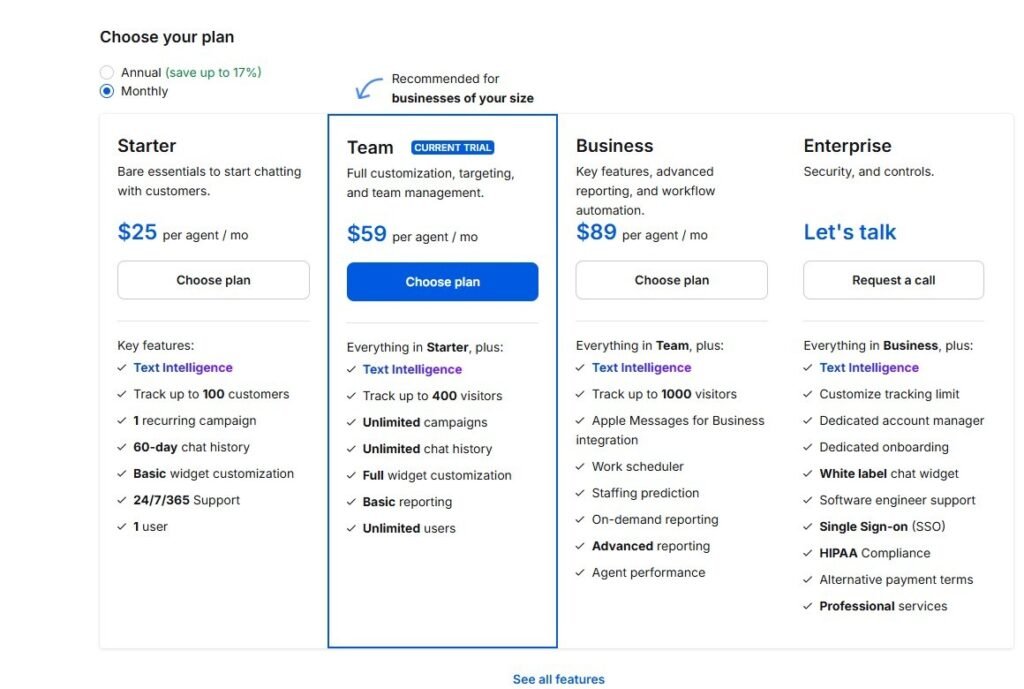
For the Team plan we tested, 12 months would total $708 if paid month-to-month versus an equivalent $588 when billed annually, a $120 yearly difference per agent.
The main value concern is scale. Five Team agents would cost $295 per month on monthly billing before considering any other connected products. Businesses that need advanced reporting also have to move to Business.
Support test: fast escalation, but an accuracy miss
We deliberately tested support with a plan-entitlement question. We asked whether Chat Duration reporting was included in Team and what we would lose by moving to Starter.
The AI assistant initially told us Chat Duration was available starting with Team and then transferred us to a human agent when we asked. The human agent initially repeated the same answer. We pointed out that our active Team trial displayed an upgrade screen for that report.
After rechecking the feature list, the human agent apologized and gave the final correction: Chat Duration reporting is available under Business and is not available in Team.
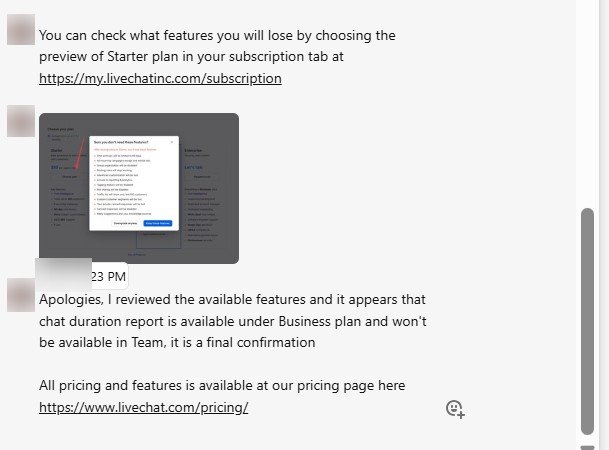
This was a mixed result. Escalation to a human was fast and the agent ultimately corrected the mistake, but both AI and human support first gave materially wrong billing-feature information. That keeps our support score below the top tier.
Who should use LiveChat?
Sales and support teams that actively use live chat
LiveChat makes the most sense when chat is an operational channel rather than a decorative widget. The agent workspace, visitor context, forms, ratings, campaigns, transcripts, and reports are designed for teams that will use them regularly.
WordPress businesses that want a polished no-code integration
The official plugin connected cleanly in our test and let us manage the visitor experience from LiveChat without editing theme files or manually placing the installation script.
Teams needing separate desktop and mobile widget behavior
Independent mobile position and spacing worked in our test, which is useful for sites where a desktop chat position would overlap mobile navigation or conversion controls.
Businesses with useful public documentation
The Knowledge Hub and reply-suggestion workflow was more useful once we imported a real public website source. Teams with accurate documentation can use that material to assist agents during conversations.
Who should look elsewhere?
LiveChat is less attractive for businesses that only need a free or very low-cost chat bubble, teams with many paid agents, or buyers who need advanced reporting while staying on the Team tier. Sites already close to performance budgets should also test the third-party payload carefully before deployment.
Alternatives worth comparing
Before acting on this LiveChat review, compare alternatives against your support volume, staffing model, AI requirements, and budget.
- Zendesk: a broader service platform for teams that need ticketing, workflows, and enterprise support operations.
- Crisp: shared inbox, live chat, and automation for small and midsize teams.
- tawk.to: a popular choice for teams primarily seeking human live chat at low software cost.
- Freshchat: customer messaging within the broader Freshworks ecosystem.
- Intercom: a broader customer-service platform with advanced automation and AI capabilities.
We did not run these alternatives through the same August 15 LiveChat methodology for this article, so this list is not a direct performance ranking.
LiveChat review verdict: Is it worth it?
This conclusion follows ProxVela’s published review methodology. You can also browse the technology reviews library for future hands-on evaluations.
Yes—for teams that want a polished, configurable live-chat operation and will actually use the agent workflow, forms, visitor context, and reporting.
LiveChat’s strongest results in our testing were straightforward WordPress integration, a polished agent workspace, flexible pre-chat forms, separate mobile customization, reliable away-mode messaging, and strong mobile Lighthouse performance despite the extra third-party payload.
The main trade-offs are per-agent pricing, advanced-reporting gates, meaningful network overhead, and the support accuracy miss we documented before the human agent corrected the answer. If those trade-offs fit your use case, you can try LiveChat free for 14 days.
8.5 / 10Excellent live-chat workflow and customization with strong mobile behavior, tempered by per-agent pricing, measurable page-weight overhead, and one support-accuracy failure that required correction.
Frequently asked questions
These LiveChat review FAQs summarize the most important findings from our hands-on test.
How long is the LiveChat trial?
Our new account showed a 14-day Team trial.
Does LiveChat work with WordPress?
Yes. We installed the official WordPress plugin and connected our local test site without manually adding the LiveChat script.
Can LiveChat use different mobile and desktop widget positions?
Yes in our test. We configured different desktop and mobile alignment and spacing, saved the changes, and verified the mobile-specific position on the local site.
Can visitors message when agents are away?
Yes when availability is set to Always. Our away-mode test delivered the visitor message and told the visitor that replies would be sent to their email address.
Can the pre-chat form collect custom information?
Yes. Beyond Name and Email, our account offered Question, Choice list, Dropdown, Multiple choice list, Group selection, and Information elements. We added and verified a custom question on the real widget.
Does LiveChat slow down WordPress?
It added substantial third-party transfer weight in our controlled test. Desktop performance moved from 100 to 91 and mobile from 100 to 98, while CLS remained 0. Results will vary by site.
Which plan includes Chat Duration reporting?
Our Team trial blocked the Chat Duration report. After initially giving the wrong answer, LiveChat human support rechecked and confirmed that Chat Duration requires the Business plan.
How much did the Team plan cost during our test?
Our subscription screen showed Team at $59 per agent per month on monthly billing, or an equivalent $49 per agent per month when billed annually.
Sources and testing records
Product and plan facts were checked against LiveChat’s own product, pricing, Help Center, and WordPress-plugin pages. The screenshots, chats, support interaction, rating, and Lighthouse results described above are from ProxVela’s original testing.
- LiveChat official website
- LiveChat pricing
- LiveChat reporting options
- LiveChat WordPress installation guide
- Official LiveChat WordPress plugin listing
- LiveChat widget customization documentation
Tested: August 15, 2026 · Last fact-check: August 15, 2026